Amazon has a habit of hiding small perks in places nobody looks. Amazon No Rush credits are a good example. You pick slower shipping, Amazon gives you a little digital credit, and then plenty of people forget it exists until it quietly expires.
I’ll be upfront: I haven’t used No-Rush myself. But I’ve dug through how it works, where the credits hide, and the rules that trip people up. And there are a few, honestly.
So here’s the plain version. What these credits are, how to check them, how to spend them, and whether they expire. Plus a quick bit on using a gift card for Prime Video, since that question comes up right alongside.
What Are Amazon No Rush Credits?
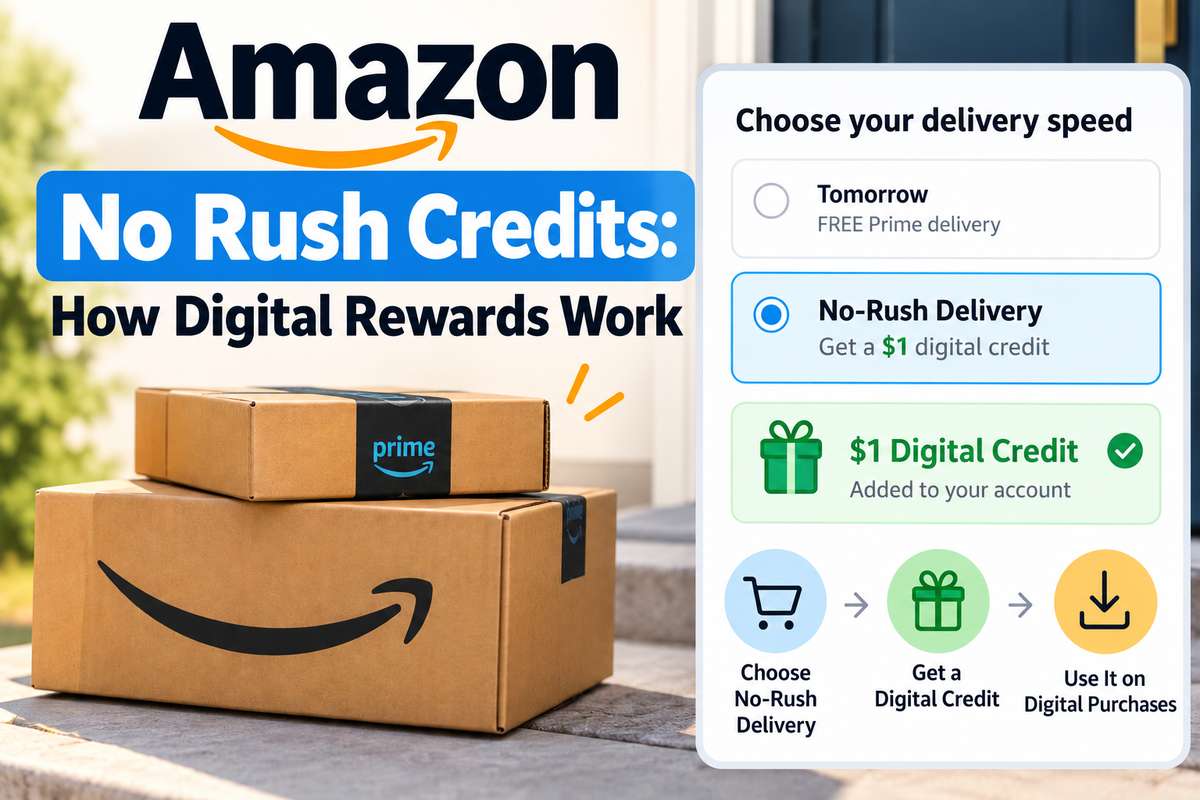
Here’s the deal. When you’re a Prime member and you choose No-Rush shipping at checkout, Amazon sometimes offers a small reward in return. You get your package a few days later, and Amazon gets to bundle deliveries more efficiently. Everyone wins, sort of.
That reward shows up as a No Rush Amazon credit after your item ships. Not when you order. After it ships. That timing confuses a lot of people, because the credit seems to vanish for a few days.
How much do you get? It varies by order, as a guide to how these credits work points out. Historically, the most common offer was a $1 digital credit, though some have been bigger. And some members say they don’t see the offer at all anymore. So treat it as a nice extra, not a guarantee.
Is the Wait Worth It?
For $1 or so? Sometimes, sure. If you don’t need something urgently, it’s free money for doing nothing. But if you’re impatient, or the item is something you actually need this week, I wouldn’t bother. A Kindle book is not worth a late phone charger.
What Is an Amazon Digital Reward?
So, what is an Amazon digital reward exactly? It’s the credit you earn from No-Rush shipping, stored on your account, that only works on digital stuff. Amazon calls them different things in different places, which doesn’t help.
You might see “No-Rush rewards,” “digital rewards,” or Prime digital credits. In practice, they all point to the same thing. Small balances that sit on your account until you spend them on something digital or until they expire.
And what are Amazon digital rewards actually good for, in practice? Small digital buys, mostly. A Kindle book, a movie rental, and a song or two. Nothing life-changing, but nothing to waste either.
One thing to clear up, because the names are confusingly close. A digital reward is not the same as an “Amazon Digital” line on your bank statement. That one is a charge, not a credit, and I explained it in my piece on what an Amazon Digital charge is.
How to Check Digital Rewards on Amazon
This is the bit most people miss. Here’s how to check digital rewards on Amazon:
- On a computer. Sign in and open Amazon’s No-Rush rewards page. There’s a button to check your balance, which opens the No-Rush Rewards Summary.
- On a TV or phone. Open Prime Video, pick something to rent or buy, then look under “More purchase options.” Your available credit shows up there.
- In your email. The shipping confirmation for a No-Rush order usually mentions the reward and its expiry date.
The summary page is the most useful one, because it shows your balance, what each credit works on, and when each one expires.
How to Use No Rush Rewards on Amazon
Good news: you mostly don’t have to do anything. If you’re wondering how to use No Rush rewards on Amazon, they apply automatically at checkout when you buy something eligible.
Eligible things usually include:
- Kindle eBooks. Probably the easiest way to spend a few dollars.
- Prime Video rentals and purchases. Rent a movie and the credit comes off the price.
- Digital music. Individual songs or albums.
- Appstore apps. Apps and in-app items for Fire tablets and Fire TV.
If the credit doesn’t cover the whole price, your normal payment method covers the rest. If it covers everything, the item is free.
What You Can’t Use Them On
Here’s where people get stuck. Amazon No Rush reward credits don’t work on physical items, Audible audiobooks, or gift cards. The gift card exclusion goes back to 2018, when Amazon updated the No-Rush terms to block them. Before that, people used to turn credits into gift cards. Not anymore.
Do Amazon Credits Expire?
Yes, and this is the part that stings. No-Rush credits expire, and Amazon doesn’t show you the date until after you’ve picked No-Rush shipping. You’ll find it in the shipping email and on the rewards summary page.
So, do Amazon points expire? It depends on which “points” you mean. No-Rush credits definitely do. Points from an Amazon credit card follow that card’s own rules, so check your card’s terms rather than assuming.
Promotional Credit Works Differently
Amazon also hands out promotional credit for other reasons. A sign-up offer, say, or a special deal. These come with their own terms and expiry dates, usually spelled out in the email that came with them.
My advice? Read that email once and note the date. And be careful. Scammers love sending fake “you’ve got a reward” messages, and I covered the common tricks in my guide to Amazon scam texts. A real credit never needs you to click a link to claim it.
How to Use an Amazon Gift Card for a Prime Video Rental
This one comes up a lot, so let’s settle it. Here’s how to use an Amazon gift card for a Prime Video rental:
- Redeem the gift card to your account. Go to Your Account, then Gift Cards, and enter the claim code. The money moves to your Amazon balance.
- Rent the movie. When you rent on Prime Video, your gift card balance is usually applied before your card.
- Use the website if your device is fussy. Some TV and phone apps limit buying options. If yours does, rent from the Prime Video website instead. The rental then shows up on all your devices.
Here’s the thing: a No-Rush credit comes off the price as a discount, and your gift card balance can then cover what’s left. Small wins.
Where Amazon’s Little Perks Are Heading
I think No-Rush credits are slowly fading into the background. Amazon keeps pushing faster delivery, and paying people to wait doesn’t quite fit that story anymore. Some members already report not seeing the offer at all.
So if you do get them, use them. Set a reminder, spend them on a Kindle book or a rental, and don’t let them expire. And while you’re digging through Prime perks, there are also free games that come with Prime that plenty of people never claim either.