
Okay so I got phished once. Not some dramatic hacker-movie thing, nothing like that. Just a normal Tuesday, a fake DocuSign email sitting in my inbox, and maybe four seconds where I didn’t think before clicking. Nothing bad happened, I caught it fast enough, but man, did it rattle me. Enough that I actually started paying attention to how these emails get built instead of just deleting and moving on like everyone does. So when someone asks me for the phish meaning, plain and simple, I’m not going to hand them a dictionary definition. I’d rather tell you what it actually feels like in that split second right before you almost fall for one.
What Does Phishing Actually Mean?
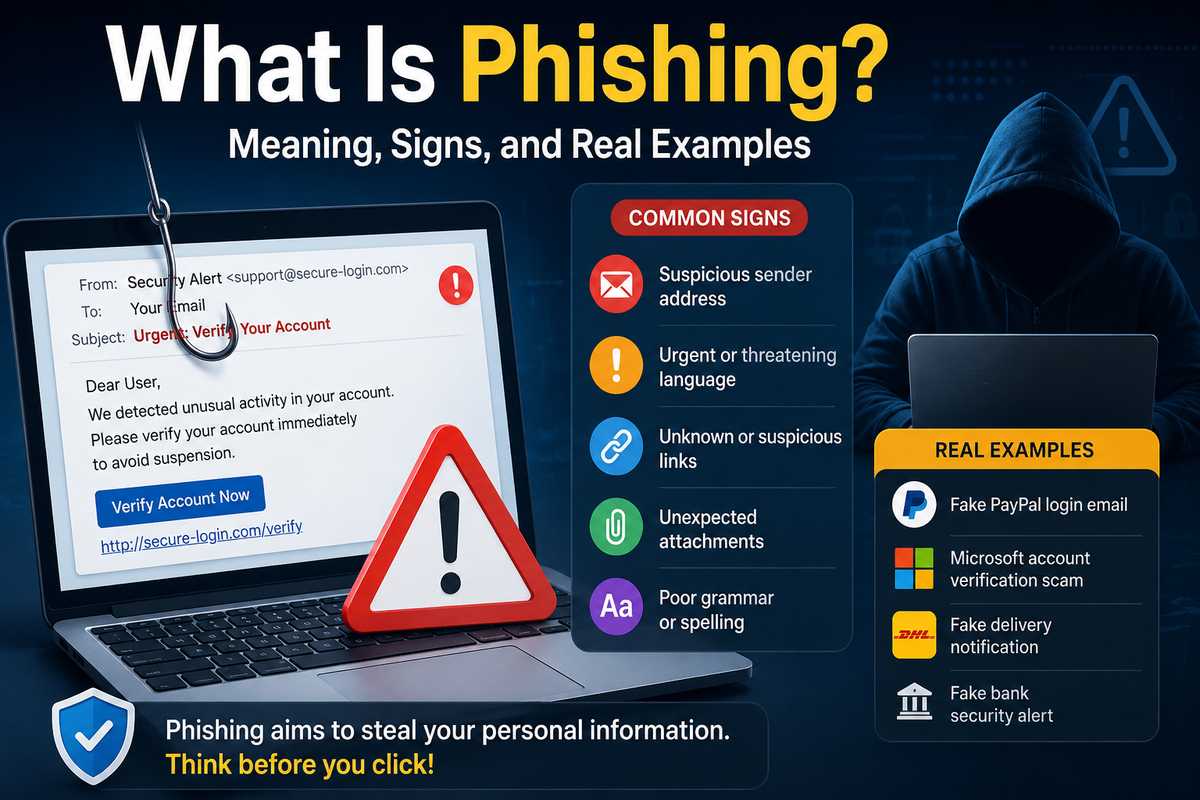
Basically, phishing is when someone pretends to be a person or a company you trust, usually over email, and the goal is getting you to hand over passwords, card numbers, or whatever access they’re after. The word itself is a deliberate misspelling of “fishing” and yeah, that metaphor works better than most tech jargon does. Attackers cast out thousands of baited messages and just wait. Someone always bites. You’ll even see people type it as fake fishing when they’re searching casually, which honestly tells you the term still trips up a lot of regular users.
Here’s where people mix things up, though. Phishing and scam aren’t the same thing, even though everyone uses them interchangeably. A scam is the bigger con, any scheme built to trick you out of money or info. Phishing is one method of running that con, usually through impersonation plus a bad link or attachment.
So spam vs scam, that’s actually the wrong pairing to compare. Spam is just unwanted bulk email, annoying but mostly harmless. A phishing email can technically be spam. But a lot of phishing is targeted enough that it skips your spam folder completely and lands right in your main inbox looking totally normal.
What a Real Phishing Email Looks Like
If you go search phishing email examples right now, you’ll mostly find these exaggerated, obviously fake screenshots. Bad grammar, weird fonts, the works. Real ones don’t look like that anymore, not even close. When people ask me what a phishing email example is in 2026, I usually point to something way more boring: a message that looks like it’s from your bank, “unusual account activity detected,” with a login link pointing to a domain that’s one single letter off from the real one.
And here’s the thing: AI has made these examples of phishing email genuinely difficult to catch. One report I came across tracked AI-assisted phishing attacks jumping 14-fold in a single month. Fourteen times, in thirty days. That’s not gradual, that’s a cliff. Driven almost entirely by criminals using generative tools to mass-produce convincing lures without needing any real skill anymore. Kind of wild when you think about how far this is from the old “Nigerian prince” emails.
More Phishing Email Examples Worth Knowing
A few phish email examples that keep showing up, both in reports and honestly in my own inbox:
- The fake invoice. An attached PDF or link claiming a payment’s overdue, built to create panic before you’d even think to check who actually sent it.
- The IT department impersonation. Asking you to “verify your credentials” through a page that mimics your company’s real login screen almost pixel for pixel.
- The delivery notice. A fake shipping alert, click the tracking link, and now something’s installing in the background or your login just got harvested.
- The calendar invite lure. The newer one, where the malicious link hides in a fake meeting invite instead of the email body itself.
Want a plain sample spam email to study? Most of them look identical to a real notification except for the sender’s actual domain. That’s the one thing attackers genuinely can’t fake, no matter how good the AI gets.
What Do Most Phishing Emails Have in Common?
People ask me what virtually all phishing emails have in common, expecting some single dead giveaway, one weird trick that spots them all. There isn’t one, sorry. But there is a pattern if you look close enough.
Almost every example of a spam email built for phishing leans on urgency. Act now. Verify immediately. Your account will be suspended in 24 hours. That urgency isn’t accidental, it’s the whole point. It’s designed to short-circuit the part of your brain that would normally slow down and double-check who’s actually sending this.
The second thing, and this answers what is a common indicator of a phishing attempt, is a mismatch somewhere. The display name says “Amazon Support,” actual email address is some random string of characters. The link text says one URL, hovering over it shows something completely different. Start checking for that mismatch specifically and honestly, a lot of phishing gets obvious pretty fast.
Why Phishing Still Works So Well
I used to think phishing was fading out as people got more tech-savvy. Turns out that’s not really true. Attackers aren’t even sticking to email anymore either, that’s the part that gets me. One analysis found device code phishing up 1,500% in 2026, with vishing rates doubling in that same stretch. Attackers are just hunting around for whatever channel your defenses haven’t caught up to yet, and right now there’s a lot of ground for them to cover. Email’s still the biggest door in, but it’s stopped being the only one, and that alone makes the whole problem harder to defend against.
How AI Is Reshaping the Fight
Some of this connects straight back to how generative AI is reshaping cybersecurity on both sides, attackers and defenders both using the same tools, just pointed in opposite directions. I went deep on this in my guide to AI in cybersecurity if you want the fuller picture. A phishing kit that used to take a skilled writer hours to put together now gets generated in seconds. Personalized, grammatically clean, ready to send, and honestly kind of scary how fast the turnaround is now.
My Honest Take on Spotting Phishing
I’m not going to sit here and pretend there’s some foolproof trick. There isn’t. The best thing I’ve personally found is just slowing down, ten seconds, before clicking anything marked urgent. Check the actual sender address, not the display name, that part gets skipped constantly. Hover over links before you trust them. And if a message is pushing you toward panic, that pressure itself is the red flag, more than any typo ever was.
If you’re on the security side rather than just guarding your own inbox, it’s worth reading how SIEM, SOAR, and XDR stack up, since catching a phishing attempt after someone’s already clicked matters just as much as trying to stop the click in the first place.
Phishing isn’t going anywhere. If anything, the AI version of it is just getting started, and these messages are only going to get harder to catch by eye alone. Staying a little suspicious of every “urgent” email you get is honestly the cheapest security tool you’ll ever use, and it costs you nothing but ten seconds.