
Every time I get a text with a link in it now, my first move isn’t clicking. It’s squinting at it for a second, like the URL is going to confess something if I stare hard enough. Sounds paranoid, I know. But after seeing how convincing scam pages have gotten, I’d rather look a little paranoid than hand over my card details to a fake shipping site. So this one’s less theory and more the actual checklist I run through before I trust any link, plus the tools that do a chunk of the work for you.
What Makes a Website Look Sketchy in the First Place
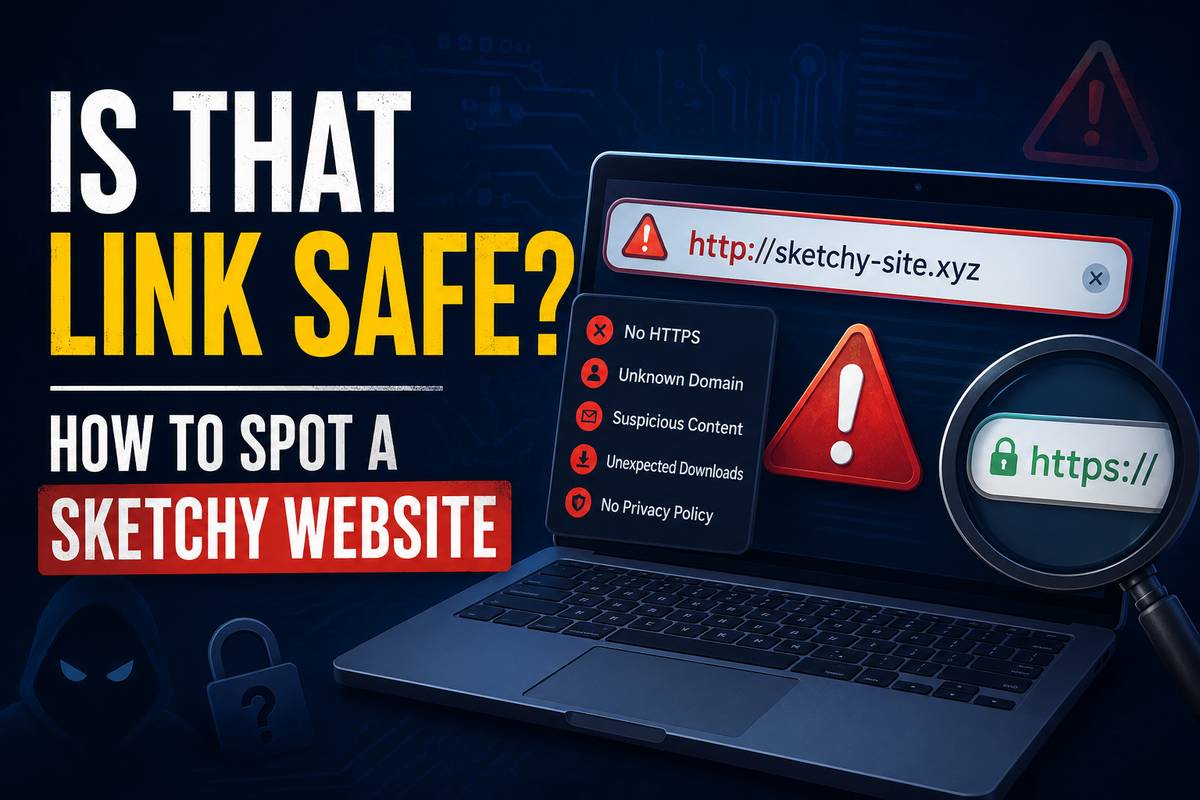
Most people can’t quite explain why a sketchy website feels off, they just get a weird gut reaction and back out of the tab. Turns out that gut reaction is usually picking up on real signals. A sketchy website often has a domain that’s almost right but not quite, like “amaz0n-support.com” instead of the real thing. The design might look rushed too, with mismatched fonts, stretched logos, and buttons that don’t quite line up.
Sketchy websites also tend to push you toward one single action fast. Enter your email. Confirm your card. Download this file now. Legitimate sites rarely corner you like that on your first visit, they let you browse around first. If a site is begging for information before you’ve even seen what it actually offers, that’s usually your answer right there.
One more thing I’ve noticed: check how the site talks about itself. Real businesses have an about page, a real address, and maybe a phone number that actually connects to someone. Scam pages skip all of that or fake it badly, sometimes just a stock photo and a vague “we’re a trusted provider” line with nothing behind it.
Payment options tell a story too. A sketchy website that only accepts gift cards, crypto, or a wire transfer is basically waving a flag at you. Legitimate stores take normal cards and offer some kind of buyer protection. If the checkout page feels like it’s actively steering you away from any payment method you could dispute later, that’s not a coincidence, that’s the whole design.
How to Check if a Link Is Actually Legit
So how do you tell if a link is legit before you click it? Start by hovering over it, don’t tap yet. On desktop this shows the real destination URL at the bottom of your browser. On mobile, press and hold instead of tapping, most phones will show a preview.
Next, look at the domain itself, not just the words around it. Attackers count on people reading “PayPal” in the link text and not noticing the actual address underneath, which says something completely different. If you’re still unsure whether a link is legitimate, copy the URL and paste it somewhere safe to look at, don’t just click and hope for the best.
Also pay attention to how the link arrived in the first place. A safe link from your actual bank almost never shows up out of nowhere over text message. Banks, delivery companies, and most legitimate services stick to a handful of predictable channels, usually app notifications or emails tied to an account you already opened yourself. The second is a “safe-looking” link that jumps channels, like a bank alert arriving over SMS when you never signed up for text alerts, that mismatch alone is worth pausing on.
A recent Forbes piece on imposter scams pointed out that fraud losses jumped from $405 million to $797 million in a single year, and a huge chunk of that came down to people trusting a link or QR code that looked official enough not to question. That gap between “looks official” and “is official” is exactly where these scams live.
Shady Links and Spam Sites Share One Bad Habit
Every shady link I’ve ever traced back to its source had the same tell: urgency stacked on top of a reason to skip your normal caution. Spamming websites work the same playbook whether they’re pushing fake prizes, fake refunds, or fake account alerts. The message always wants you moving faster than you’d normally move.
This overlaps a lot with what I laid out in my phishing meaning and examples guide, since a shady link is basically the delivery method and phishing is the broader scheme it’s usually part of. Once you’ve read a handful of these scam sites, the pattern gets almost boring to spot. Same urgency, same missing details, same “click now or else” energy dressed up in slightly different branding each time.
Tools That Check Links So You Don’t Have To
If you’d rather not manually vet every link, tools like CheckPhish exist specifically for this. You paste in a URL, it scans the page and flags known phishing patterns, fake login forms, and suspicious redirects. It’s not perfect, brand-new scam pages can slip through before they’re indexed anywhere, but it catches a lot of the obvious stuff fast.
Worth remembering, though, even sources that look completely legitimate can get compromised. I covered a case exactly like this in my breakdown of the OpenAI Hugging Face security incident, where a trusted platform ended up at the center of a serious breach. The lesson there applies to link safety too: legit-looking and actually safe aren’t always the same thing, even for names you’d normally trust without a second thought.
Browser-level warnings help too, and most people ignore them completely. Chrome, Safari, and Edge all flag known malicious sites before the page even loads, with a red screen, a big warning, and a “back to safety” button in the front and center. I get why people click through anyway, the warning feels like an annoying speed bump rather than a real threat. But those flags are pulled from constantly updated blocklists, and the false positive rate is genuinely low. If your browser is telling you to stop, that’s worth more weight than your own gut check in that moment.
QR Codes Are the New Shady Link
Here’s a shift I didn’t see coming until pretty recently. Scammers know people got wise to obvious phishing links, so a lot of them switched to QR codes instead. Same malicious destination, just hidden behind a scan instead of a visible URL you could actually read first.
One report on a traffic ticket scam found that fake QR codes on official-looking notices were replacing clickable links entirely, specifically because people had gotten better at spotting suspicious text links. Scan the code, your phone shows you the destination URL before it opens anything. Read it the same way you’d read any other link. If it doesn’t match where you expected to land, close it out and move on.
My Honest Take on Vetting Links
None of this needs to be complicated. Hover before you click. Check the actual domain, not just the display text. Treat urgency as a warning sign instead of a reason to hurry. And if something feels a little too eager to get your information, trust that feeling, it’s usually right.
I’m not saying you need to run every single link through a scanner before opening it, that’s exhausting and honestly overkill for most day-to-day browsing. Just slow down for the ones that ask for something. Money, login info, and personal details. That’s where the real risk lives, and that’s where a few extra seconds actually pays off.