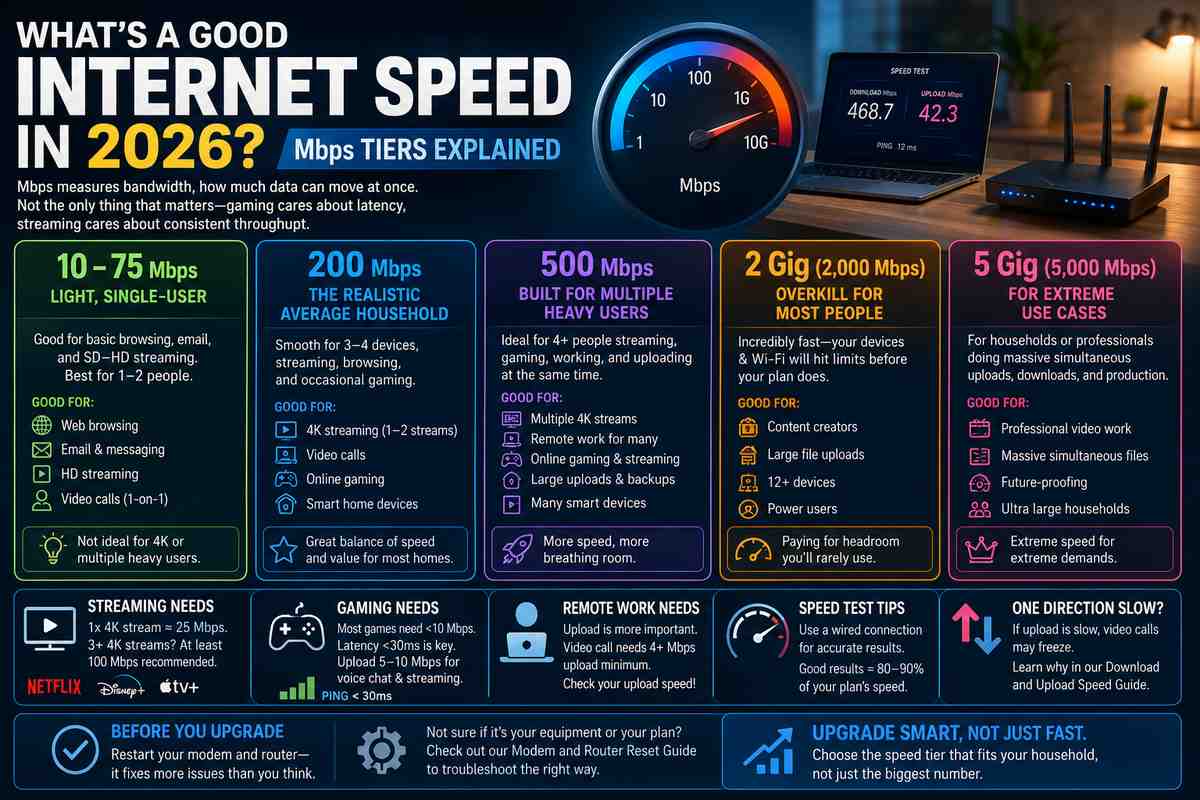

“What is a decent internet speed” doesn’t have one answer. Never has. A single person streaming Netflix and a house of five gaming, working from home, and running smart cameras need completely different plans. Here’s what each speed tier actually gets you in 2026 and how to figure out where you actually land instead of guessing based on a number an ISP salesperson threw at you.
Quick framing before the numbers: Mbps measures bandwidth, how much data can move at once. It’s not the only thing that matters. Gaming cares more about latency than raw speed. Streaming cares about consistent throughput. Keep that in mind as you read the tiers below.
10 to 75 Mbps: Light, Single-User Territory
Bottom tier, and honestly still fine for a lot of people. 10 Mbps internet speed handles basic browsing, email, and SD video without much trouble. Push past a single HD stream or add a second device, though, and it starts to strain.
50 Mbps internet speed is the more realistic modern floor. Covers HD streaming, video calls, and casual browsing for one or two people without constant buffering. 75 Mbps internet speed gives a little more headroom, useful if you’ve got a couple devices syncing in the background while you stream.
None of this tier handles 4K well, and none of it survives multiple people doing demanding things simultaneously. If that’s your household, skip ahead.
200 Mbps: The Realistic Average Household Floor
This is where most households actually land, and for good reason. Is 200 Mbps fast? For a typical home with 3 to 4 devices, streaming, browsing, and occasional gaming, yes, comfortably.
200 Mbps internet handles a single 4K stream (needs about 25 Mbps) plus several other devices with room to spare. Where it starts to strain: three or more simultaneous 4K streams, heavy gaming while someone else uploads a large file, or a house full of smart home devices all phoning home at once.
Is 200 mbps fast internet for a solo user or a couple? Overkill, honestly, but the price difference between 100 and 200 Mbps plans is often small enough that it’s worth the extra headroom anyway.
500 Mbps: Built for Multiple Heavy Users
Is 500 Mbps internet fast? Yes, and it’s where most multi-person households with real demands should actually be looking. Four or more people streaming, gaming, and video-calling at once needs this as a realistic floor, not a luxury tier.
Is 500mbps fast internet for remote work specifically? More than enough, even multiple people on video calls simultaneously won’t strain it, assuming upload speed on the plan keeps pace, which isn’t always guaranteed on cable connections built asymmetrically.
This tier also gives real breathing room for background activity, OS updates, cloud backups, and smart cameras that invisibly eat bandwidth without anyone noticing until things slow down.
2 Gig and 5 Gig: Overkill for Almost Everyone
2 gig internet speed sounds impressive, and for most households, it genuinely is more than needed. How fast is 2 gig internet in practical terms? Fast enough that you’ll almost never be the bottleneck, your Wi-Fi and individual devices will hit their ceiling long before the plan does.
Is 2 gig internet good for anything specific? Content creators uploading massive files, households running a dozen-plus devices simultaneously, or anyone who genuinely maxes out 500 Mbps regularly. For everyone else, it’s paying for headroom you’ll rarely touch.
5 gig internet speed exists mostly for future-proofing and genuinely extreme use cases, multiple people doing professional video work, massive simultaneous downloads, and that kind of thing. Most residential customers will never come close to needing it.
What Streaming Actually Needs
A single 4K stream needs roughly 25Mbps. Multiply that per simultaneous stream, then add headroom for everything else running in the background. SpeedTestHQ’s breakdown recommends 100 Mbps minimum once you’ve got 3 or more 4K streams running at once in the same house, and that number climbs fast in a household where everyone has their own TV or tablet going simultaneously.
Platform matters too. Some streaming services compress video more aggressively than others, so the same “4K” label doesn’t always mean identical bandwidth demand across Netflix, Disney+, and Apple TV+.
What Gaming Actually Needs
This is where the Mbps obsession falls apart a little. Raw speed matters far less than people assume for gaming specifically. Most games need under 10Mbps download to run smoothly, sometimes as little as 3Mbps for older or less graphically demanding titles.
Latency is what actually decides whether gaming feels good. Under 30ms ping is the target for competitive play, and a 25Mbps connection with excellent latency will consistently beat a gigabit plan running on a network path with bad ping. Upload matters more here than most people expect too, if you’re streaming your gameplay or in constant voice chat, a 5 to 10 Mbps upload keeps that stable without choking your download.
What Remote Work and Small Business Actually Need
Upload speed is the number to actually watch here, not download. A decent video call needs 4 or more Mbps upload, and cable plans often cap upload well below their advertised download figure, sometimes by a wide margin. What is a good internet speed for working from home really comes down to checking that upload number specifically rather than just the headline download speed on the plan.
Recommended internet speed for a small business depends heavily on headcount and what you’re running simultaneously, cloud tools, video conferencing, and point-of-sale systems all draw from the same pool. BroadbandSearch’s household sizing guide applies similar logic here: plan around peak simultaneous use, not average daily use, since that’s when things actually break.
How to Check What You’re Actually Getting
What are good internet speed test results? Ideally within 80 to 90% of your plan’s advertised number. Run the test wired directly into the modem for the most accurate reading, Wi-Fi will almost always show lower numbers, and that’s normal, not a sign something’s broken.
If your results consistently fall well below that range, even wired, the cause is more likely your equipment or your ISP than a plan that’s genuinely too small. My why is my internet so slow guide walks through the most common causes before you assume an upgrade is the answer.
If Only One Direction Feels Slow
Sometimes it’s not your overall speed that’s the problem, it’s a lopsided split between download and upload. Video calls freezing while everything else feels fine points at upload specifically, not your plan’s headline number.
If that’s what you’re seeing, the fix usually isn’t a bigger plan, it’s understanding why upload and download perform so differently in the first place. I go through that split in detail in my download and upload speed guide.
Before You Pay for an Upgrade
Rule out the simple stuff first. A restart fixes more speed complaints than people expect, often more than actually paying for a bigger plan does. My modem and router reset guide covers doing this properly, along with how to tell when the equipment itself, not the plan, is actually the bottleneck.