
If you’ve ever opened a website and it just wouldn’t load, there’s a chance that a DDoS attack was involved.
Not always, of course; sometimes it’s just inadequate hosting or too much traffic. But often, the problem isn’t popularity. It’s artificial traffic designed to overwhelm the site.
What makes DDoS attacks confusing is that nothing is technically “broken.” The website is still there. The server is still running. But it’s buried under so many requests that it can’t respond to real users anymore.
That’s what we’re going to unpack here: what’s actually happening behind the scenes, without getting lost in technical jargon.
What Does “DDoS” Actually Mean?
DDoS stands for Distributed Denial-of-Service.
That sounds complicated, but if you split it,
- Distributed → coming from many different sources
- Denial of Service → making a service unavailable
Put together, it simply means the following:
Various systems are employed to disrupt a website’s functionality.
What’s Really Going On During an Attack
Let’s focus on the basics.
A normal visitor opens your website, and your server responds and loads.
Now imagine this instead:
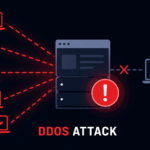
- Thousands of fake visitors hit your site at the same time
- Each one sends requests
- Your server tries to respond to all of them
At some point, it simply can’t keep up.
Not because it’s hacked. Not because it’s broken.
Just because it’s overloaded.
One of the greatest challenges is recognizing an attack before it fully crashes your site. If you understand the early signs of a DDoS attack, you can take action before things get worse.
Where Does All That Traffic Come From?
This is where the “distributed” part matters.
Attackers don’t use one system. They use many.
Typically, attackers execute such an attack using a botnet, a network of compromised devices under remote control.
These devices could be:
- Old computers
- Servers
- Even IoT devices
Individually, they don’t do much. Together, they can generate massive traffic.
Why Would Someone Do This?
There isn’t always a dramatic reason.
Sometimes it’s
- Testing tools
- Automated scripts running in the background
- Low-level malicious activity
In other cases, it can be intentional:
- Trying to take down a competitor
- Targeting a specific website
- Causing disruption
But honestly, many attacks are just noise on the internet.
Different Ways DDoS Attacks Happen
You don’t need to memorize categories, but understanding the basic idea helps.
1. Pure Traffic Overload
This is the simplest type.
The attacker just sends a huge amount of traffic.
Nothing fancy, just volume.
2. Resource Exhaustion
Here, the goal isn’t bandwidth; it’s your server’s internal limits.
Each request consumes memory or CPU.
If you have too many of them, your server will slow down or crash.
3. “Looks Normal” Requests
These are more subtle.
Instead of obvious spam traffic, requests look like real users browsing pages.
That makes them harder to detect.
How to Tell If Something’s Wrong
You don’t always get a clear warning.
But some patterns show up:
- Your site suddenly becomes slow
- Pages load partially or not at all
- Traffic spikes without matching analytics data
- Server usage goes unusually high
The key is unexpected behavior.
If something feels off and you can’t explain it, it’s worth checking.
Can You Stop DDoS Attacks Completely?
Not really.
And trying to “stop them completely” isn’t the right goal anyway.
What you want is:
Your site stays online even if an attack happens.
That’s a much more practical approach.
What Actually Helps (Without Overcomplicating It)
You don’t need a complicated setup to handle most situations.
Put a Protection Layer in Front of Your Site
Instead of letting traffic hit your server directly, route it through a service that filters requests.
This is where tools like Cloudflare come in.
They absorb hazardous traffic before it reaches your server.
Avoid Single-Point Dependencies
If everything relies on one server with limited capacity, it’s easier to overwhelm.
Even basic scalable setups handle spikes better.
Limit Abnormal Behavior
If one source is making too many requests too quickly, that’s not normal.
Rate limiting helps reduce this kind of load.
Pay Attention to Patterns
You don’t need to constantly monitor.
But checking occasionally helps you spot unusual activity early.
If you want an easy way to handle attacks without technical setup, refer to these best DDoS protection tools for small websites that can automatically protect your site.
Where This Fits With the Tools You’ve Seen
If you’ve already looked at different protection tools, this section is where everything connects.
Those tools aren’t doing anything magical; they’re just
- Filtering traffic
- Distributing load
- Blocking suspicious patterns
If you haven’t yet, it’s worth going through a comparison of those tools so you can choose something that fits your setup.
When Should You Be Concerned About This Issue?
If your site is brand new, you don’t need to overthink it.
But you should start paying attention when:
- You’re getting consistent traffic
- Your site matters (blog, business, etc.)
- Downtime would actually affect you
That’s usually the point where basic protection becomes important.
What Is a DDoS Attack? – FAQs
DDoS stands for Distributed Denial-of-Service. “Distributed” means the attack comes from many different devices at once, and “Denial-of-Service” means it’s trying to make your website or service unavailable to real users.
This distinction confuses many people. A hacker tries to get into your system, steal data, plant malware, and that sort of thing. A DDoS attacker doesn’t want inside; they just want to overwhelm your server with so much traffic that it collapses under the weight. Nothing is technically “broken”; it’s more like a crowd blocking a doorway.
Unfortunately, yes. Most small websites that attackers hit don’t get targeted on purpose; they just get caught in the crossfire of automated attack scripts running in the background. It’s not always personal. Bots don’t really care how big your site is.
Usually, your site just gets painfully slow, pages stop loading halfway, or it goes completely offline. The tricky part is that it looks the same as a server outage or a traffic spike from a viral post. If your analytics don’t show a matching spike in real visitors, that’s a red flag.
Attackers use something called a “botnet,” a large network of devices (old computers, servers, even smart home gadgets) that have been secretly compromised and are now under the attacker’s control. Each device sends requests on its own, but together they can generate an enormous amount of traffic.
Yes, in most countries it’s considered a cybercrime. That said, it doesn’t always stop people from doing it; enforcement is complicated, especially when attackers are operating across different jurisdictions.
Honestly? No. Anyone can be targeted. But “prevention” isn’t really the right goal; what you actually want is for your site to stay online even when it’s under attack. That’s a much more achievable target, and effective protection tools handle exactly that.
Routing your traffic through a service like Cloudflare is probably the simplest first step. It acts as a buffer between the internet and your server, filtering out suspicious traffic before it ever reaches you. And the free tier is enough to handle most small-site scenarios.
No, that’s not what they’re designed for. A DDoS attack is purely about disruption. The goal is to take you offline, not to break in. If you’re worried about data theft, that’s a separate conversation involving different kinds of threats.
It varies a lot. Some last a few minutes; others can drag on for hours or even days depending on who’s behind it and why. Automated attacks often stop on their own once the botnet moves on to the next target. Targeted attacks can be more persistent.
Not really, especially for a small or mid-sized site. The basics, such as a CDN/proxy layer, rate limiting, and monitoring unusual traffic patterns, cover the vast majority of real-world scenarios. You don’t need an enterprise security team to get meaningful protection.
Monitor for unusual signs: unexpected spikes in traffic, high CPU or memory usage, requests from unusual locations, or user reports of inaccessibility while the site appears fine on your end. None of these alone confirm an attack, but combined they’re a pretty strong signal.
Final Thoughts
A DDoS attack isn’t as mysterious as it sounds.
It’s not about hacking into your site or stealing data.
It’s about overwhelming your system with more traffic than it can handle.
Once you understand that, everything else becomes easier to manage.
You don’t need complex setups.
You just need to make sure your site isn’t directly exposed to raw traffic without any filtering.
That alone solves most problems.
The easiest way to protect your website is by using free DDoS protection tools that handle traffic filtering automatically.