College in 2026 looks nothing like it did five years ago. The average student is stretched thin by back-to-back lectures, research papers, part-time jobs, and the constant pressure of deadlines. The good news? AI tools have quietly become one of the most powerful weapons a student can have not to do the work for you, but to help you work smarter, understand concepts faster, and manage your time better.
A survey found that over 70% of college students now use at least one AI tool regularly for academic work. The challenge isn’t finding AI tools; it’s knowing which ones are actually worth your time, which ones are genuinely free, and which ones are built for your specific field of study.
This guide covers the best AI tools for college students in 2026, broken down by budget and by student type, whether you’re an engineering student, nursing student, MBA student, or graduate researcher. Every tool listed here has been selected based on usefulness, affordability, and how well it fits into real student life.
Quick Comparison: Best AI Tools for College Students at a Glance
|
Tool |
Best For |
Free Plan? |
Paid Plan |
Student Discount? |
|
ChatGPT |
All-round study assistant |
Yes (GPT-4o mini) |
$20/month (Plus) |
No |
|
Perplexity AI |
Cited research & fact-checking |
Yes (unlimited basic) |
$20/month |
No |
|
Google Gemini |
Google Workspace users |
Yes |
Included in Google One |
No |
|
Grammarly |
Writing & grammar |
Yes (basic) |
~$12/month |
Yes (seasonal) |
|
Notion AI |
Note organization |
Yes (limited) |
$10/month |
Yes (free for students) |
|
GitHub Copilot |
Coding (engineering students) |
Free for students |
$10/month |
Yes (free via GitHub Education) |
|
Otter.ai |
Lecture transcription |
Yes (300 min/month) |
From $10/month |
Yes |
|
Wolfram Alpha |
Math & STEM problem-solving |
Yes (basic) |
~$7/month |
Yes |
|
Elicit |
Literature reviews (grad students) |
Yes (generous) |
From $12/month |
No |
|
Scite.ai |
Academic paper analysis |
Free trial |
~$20/month |
Yes |
|
Osmosis |
Nursing & medical students |
No |
Varies by institution |
Via university |
|
Anki |
Flashcards & memorization |
Yes (desktop & Android) |
$35 one-time (iPhone) |
N/A |
|
Claude |
Long document analysis |
Yes |
$20/month (Pro) |
No |
|
Jenni AI |
Academic writing |
Yes (limited) |
~$12/month |
No |
|
ChatGPT Plus |
Data analysis & advanced tasks |
No |
$20/month |
No |
What to Look for in an AI Tool as a Student
Before jumping into recommendations, it helps to know what actually matters when choosing an AI tool. Not every tool that works for a professional will work for a student. Here’s what to evaluate:
- Cost: Does it have a meaningful free plan? Can you afford the paid version on a student budget? Many tools offer student discounts worth looking for.
- Ease of use: You shouldn’t need a technical background to get value out of it. If the setup takes more than five minutes, it should be worth it.
- Accuracy and reliability: Some AI tools confidently produce wrong information. For academic work, such behavior is dangerous. Always check whether a tool cites its sources.
- Academic integrity: Does the tool help you think better, or does it encourage you to skip thinking altogether? Tools that support your process are valuable. Tools that replace it entirely can lead to serious trouble.
- Integration: Does it work with tools you already use, such as Google Docs, Notion, Word, or your IDE?
- Privacy: Does the tool store your data or use your inputs to train its models? Check the privacy policy before pasting sensitive coursework.
Best Free AI Tools for College Students in 2026
Most students aren’t in a position to spend heavily on software. The excellent news is that the free tiers of many AI tools are genuinely powerful, not stripped-down demos, but functional versions you can build a real workflow around.
ChatGPT (Free Version)
ChatGPT remains the most versatile free AI tool available for students. The free version provides you with access to GPT-4o mini, which handles most student tasks well: essay outlines, concept explanations, study question generation, and brainstorming.
Best for: Getting unstuck on difficult concepts, generating essay structures, and creating practice exam questions from your notes.
How to use it effectively: Instead of asking ChatGPT to write your essay, ask it to explain the topic to you first. Prompt: “Explain postcolonial theory like I’m a second-year humanities student who hasn’t read the textbook yet.” Once you understand the concept, write the essay yourself. This is how AI makes you a better student rather than a shortcut that gets you caught.
Limitation to know: ChatGPT can hallucinate; it sometimes states incorrect facts with total confidence. Never cite something from ChatGPT without verifying it in a real source first.
Perplexity AI

If ChatGPT is for thinking, Perplexity AI is for researching. Unlike ChatGPT, every answer Perplexity gives comes with clickable citations to the actual sources it used. This makes it far more useful for academic research, where you need to verify and reference your information.
Best for: Initial research on any topic, finding sources to explore further, fact-checking claims.
Free plan: Unlimited basic searches with source citations. A Pro plan is available but rarely necessary for most students.
Why it beats a Google search: Instead of scrolling through ten links, Perplexity reads them for you and gives you a synthesized answer with the sources right there.
Google Gemini
For students already living in Google Workspace Docs, Gmail, Drive, and Slides, Gemini is the natural AI companion. It’s built directly into these tools and can read, summarize, and help you write within documents you already have open.
Best for: Summarizing your own Google Docs notes, drafting emails to professors, improving writing inside Google Docs without switching tabs.
Free plan: Available to anyone with a Google account. Gemini 1.5 Flash is the base model, capable enough for most student tasks.
Notion AI

If you use Notion to organize your notes, assignments, and schedules, the limited free tier of Notion AI is worth activating. It can summarize long notes, generate to-do lists from unstructured text, and help you restructure messy lecture notes into clean study guides.
Best for: Students who already use Notion for note-taking and want to extract more value from their existing notes.
Free plan: Limited AI responses per month, enough to try it properly and decide if the paid upgrade is worth it.
Grammarly (Free Version)
Grammarly is the simplest AI upgrade most students can make. It runs in the background as you write in Google Docs, in your browser, and in email and catches grammar errors, awkward phrasing, and spelling mistakes in real time.
Best for: Polishing any written work before submission. Especially valuable for students writing in English as a second language.
Free plan: Grammar, spelling, and punctuation checking. The paid plan adds tone suggestions and full-sentence rewrites, but the free version is genuinely useful on its own.
Best Paid AI Tools Worth the Investment for Students
If you use AI tools daily and find yourself hitting the limits of free plans, these paid options are worth the cost, especially if you use them to save hours every week.
ChatGPT Plus ($20/month)

The paid version of ChatGPT unlocks GPT-4o with higher usage limits, DALL·E image generation, and Advanced Data Analysis a feature that lets you upload a dataset (like a CSV or Excel file) and ask the AI to analyze it, generate charts, and explain the results in plain English.
Best for: Students in data-heavy courses (statistics, economics, social sciences, engineering) who need help understanding datasets and visualizing results.
Student tip: Use the Advanced Data Analysis feature by uploading your assignment dataset and prompting, “Analyze this data, identify the key trends, and explain what a student studying consumer behavior should notice.” You still need to interpret and write up the findings yourself, but you have already done the heavy lifting of spotting patterns.
Grammarly Premium (~$12/month on annual plan)
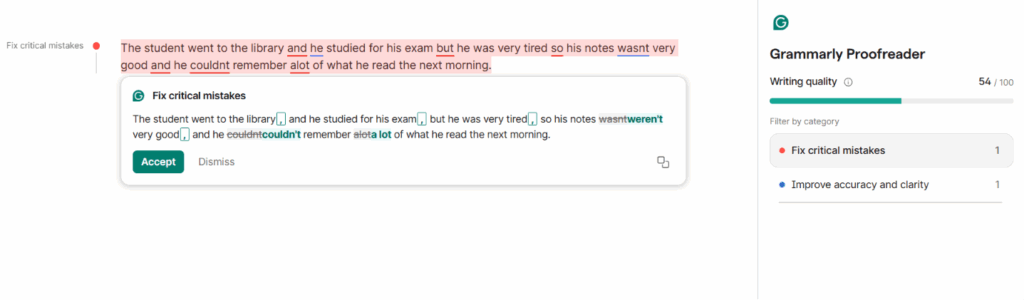
The jump from free to premium Grammarly is significant for students who write frequently. Premium adds full-sentence rewrites for clarity, a tone detector, a plagiarism checker, and suggestions for making academic writing more concise and formal.
Best for: Students writing dissertations, research papers, or frequent essays who want a final-pass tool before submission.
Look for: Look for Grammarly’s student discounts, which regularly appear around the start of each semester.
Otter.ai (from $10/month)

Otter.ai records audio and generates a real-time transcript and summary. For students, this means recording a lecture and getting a searchable, readable version of everything they said without the stress of frantic note-taking.
Best for: Students with ADHD, auditory learners who prefer reading back over notes, or anyone whose lectures move faster than they can write.
Free plan: 300 minutes of transcription per month, which covers roughly 5–6 hour-long lectures. The paid plan removes this limit.
Practical workflow: Record the lecture with Otter, then paste the transcript into ChatGPT and prompt it: “Turn this lecture transcript into a structured set of study notes with key concepts, definitions, and three likely exam questions.”
Scite.ai (~$20/month)
Scite is the tool most students have never heard of but graduate students swear by. It shows you not just which papers cite a given study but how they cite it, whether they support, dispute, or simply mention the findings.
Best for: Anyone writing literature reviews, research papers, or dissertations who needs to understand the academic conversation around a topic, not just find references.
Free trial: Available. Worth testing before committing.
Best AI Tools for Engineering Students
Engineering students have specific demands: coding assistance, mathematical problem-solving, technical documentation, and lab report writing. General AI tools help, but these are the ones built for technical work.
GitHub Copilot

For computer science and software engineering students, GitHub Copilot is the most transformative free tool available. It integrates directly into VS Code and other IDEs, suggesting code completions as you type, explaining error messages, and generating entire functions from a comment describing what you want.
Best for: Any student writing code from introductory programming courses all the way through final-year software projects.
Cost: Free for verified students through the GitHub Student Developer Pack. Apply for the GitHub Student Developer Pack with your student email; approval usually takes 24–48 hours.
What the GitHub Student Developer Pack also includes: Beyond Copilot, the pack includes free access to dozens of tools, including JetBrains IDEs, Namecheap domains, MongoDB Atlas, and more. Every engineering student should apply immediately.
Wolfram Alpha

Where ChatGPT approximates mathematical answers, Wolfram Alpha computes them precisely. It solves calculus problems, differential equations, linear algebra, physics formulas, and chemistry equations step by step with verified results, not AI guesses.
Best for: Any STEM student who needs to check their work on mathematical problems or get step-by-step solutions to understand the method.
Free plan: Basic computations and results. The Pro plan (~$7/month) unlocks full step-by-step solutions, which are invaluable for understanding how to reach an answer, not just what it is.
Consensus
Consensus is an AI-powered academic search engine that surfaces peer-reviewed papers relevant to any research question. Unlike general web search, it filters out blogs and opinion pieces and focuses on published scientific research.
Best for: Engineering students writing technical reports or literature reviews who need credible, peer-reviewed sources quickly.
Free plan: Limited searches per month are enough for occasional use. Heavy users may want to upgrade.
AI Tools for MBA Students
MBA students have diverse needs when it comes to AI. Business case analysis, financial modeling support, market research, and presentation building are the priorities.
- ChatGPT Plus: Ideal for building SWOT analyses, Porter’s Five Forces breakdowns, and business case frameworks. Prompt it with the company, industry, and assignment brief; then use it to brainstorm angles you develop yourself.
- Beautiful.ai: An AI-powered presentation builder that structures slides automatically. This is particularly useful for MBA pitch decks when design isn’t your strength.
- Rows.ai: An AI-enhanced spreadsheet tool is useful for financial modeling exercises. Ask it to explain formulas or help structure a financial model.
- Exploding Topics: A trend-spotting tool useful for strategy assignments where you need to identify emerging markets or technologies before they become mainstream.
Best AI Tools for Nursing Students
Nursing students deal with pharmacology, pathophysiology, patient care simulations, and clinical documentation—an extremely demanding combination. AI tools need to be accurate and used responsibly in this context.
Important: Always verify AI-generated medical information against your course textbooks, clinical guidelines, and your instructors. Never rely on AI output in clinical settings. Use these tools for learning, not for clinical decision-making.
Osmosis by Elsevier
Osmosis is a dedicated medical and nursing education platform that uses AI to personalize learning. It adapts to your strengths and weaknesses using spaced repetition and includes high-quality video explanations of pathophysiology and pharmacology topics.
Best for: Visual learners studying for NCLEX or preparing for clinical placements. The explanations are significantly clearer than most textbooks for complex topics.
Cost: Often available through nursing schools as an institutional subscription check with your library before paying out of pocket.
ChatGPT for Nursing Concept Explanations
ChatGPT is particularly good at breaking down complex nursing concepts into plain language. When you’re stuck on a pharmacology mechanism or a pathophysiology concept, prompt it specifically:
“Explain the mechanism of action of ACE inhibitors as if you’re teaching a second-year nursing student preparing for NCLEX. Include why they’re used in heart failure and what side effects to monitor.”
This kind of targeted prompt gets you a clear, useful explanation in under 30 seconds. Always cross-verify the information against your textbook before using it in assessments.
Anki with AI-Generated Flashcards

Anki is a free spaced repetition flashcard app, one of the most evidence-backed study methods in existence. The challenge is creating the cards, which is time-consuming. AI removes that barrier entirely.
Workflow: After each lecture, paste your notes into ChatGPT and prompt the following: Create 20 Anki-style flashcard question-and-answer pairs from these nursing lecture notes. Focus on drug names, mechanisms, dosages, and nursing considerations. Copy the output into Anki, and your flashcard deck is done in minutes.
Cost: Free on desktop and Android. A one-time $35 on an iPhone is worth every cent for nursing students who use it consistently.
Understanding AI in Clinical Settings: Nuance DAX
Nuance DAX is a professional AI clinical documentation tool used in hospitals to automate clinical notes. Nursing students won’t use it directly, but being aware of it prepares you for clinical placements and future workplaces. Understanding how AI-driven automated student communications tools and clinical AI systems work gives you a genuine edge in interviews and clinical discussions.
Best AI Tools for Graduate Students
Graduate students have more demanding research and writing requirements than undergraduates. Literature reviews, original research contributions, citation management, and long-form academic writing all require tools that go deeper than general-purpose AI assistants.
Elicit

Elicit is the most useful AI tool most graduate students have never heard of. It’s built specifically for academic literature reviews. You enter a research question, and it searches the academic literature, extracts key findings from relevant papers, and presents them in a structured, comparable format.
Best for: Starting a literature review. Instead of spending a week reading abstracts, Elicit gives you a structured overview in an hour that you then deepen through full-paper reading.
Free plan: A generous free tier that covers most graduate student needs.
Why it matters: AI tools for student retention and success in universities aren’t just about passing exams at the graduate level; they’re about producing original work efficiently without drowning in information overload. Elicit directly addresses these concerns.
Zotero with AI Plugins
Zotero is the gold standard free reference manager for academic researchers. It saves papers from the web with one click, formats citations in any style (APA, MLA, Chicago, Harvard), and organizes your library with tags and folders.
The newer ZotGPT plugin allows you to chat with your Zotero library, asking questions across all your saved papers and getting synthesized answers with citations. This is particularly powerful when you have 50+ sources and need to find connections between them.
Cost: Free. No paid plan needed.
Claude by Anthropic

Claude is especially useful for graduate students because of its large context window; it can process up to 200,000 tokens in a single conversation, which means you can paste an entire dissertation chapter, a long research paper, or a set of detailed notes and ask for feedback, a summary, or analysis.
Best for: Getting feedback on long-form academic writing, analyzing lengthy research papers, and working through complex arguments in your thesis.
Practical use: Paste a full chapter draft and prompt: “Review this dissertation chapter for logical coherence, identify any arguments that need stronger evidence, and flag any sections that are unclear or redundant.”
Free plan: Available at claude.ai with generous daily usage limits.
Jenni AI
Jenni AI is built specifically for academic writing. Unlike general AI tools, it generates text in an academic tone, adds in-text citations as you write, and is designed to complement your thinking rather than replace it. It suggests continuations of sentences rather than writing entire paragraphs for you.
Best for: Graduate students who need to write consistently in formal academic style and want assistance maintaining flow without resorting to wholesale AI generation.
Cost: A free plan is available; paid plans start at approximately $12/month.
Free AI Study Tools for Students By Use Case
Here’s a quick-reference breakdown of the best free AI tools organized by what you need to do:
|
What you need to do |
Best free AI tool |
|
Writing assistance & grammar |
Grammarly (free), QuillBot |
|
Research & finding sources |
Perplexity AI, Elicit |
|
Summarizing PDFs & papers |
ChatPDF, Adobe AI PDF reader |
|
Flashcards & memorization |
Anki + ChatGPT-generated cards |
|
Coding help |
GitHub Copilot (free via GitHub Education Pack) |
|
Note organization |
Notion AI (limited free), Obsidian |
|
Lecture transcription |
Otter.ai (300 min/month free) |
|
Math & engineering problems |
Wolfram Alpha, Photomath |
|
Presentation building |
Gamma.app (free tier) |
|
Academic paper discovery |
Consensus, Semantic Scholar |
How to Use AI Tools Without Violating Academic Integrity
This section matters more than any tool recommendation in this article. AI is only as ethical as the student using it.
Most universities now have formal AI use policies. Before using any AI tool for coursework, find your institution’s policy; it’s usually in the student handbook or academic integrity section of the university website. Policies vary significantly: some universities allow AI freely, others prohibit it entirely, and many fall somewhere in between.
Acceptable uses of AI (in most policies):
- Brainstorming and generating ideas you then develop yourself
- Asking AI to explain concepts you don’t understand
- Using AI to proofread and improve grammar in your own writing
- Using AI to find research leads you then verify and read yourself
- Summarizing papers as a starting point then reading the actual paper
Typically unacceptable uses:
- Submitting AI-generated text as your own work
- Using AI to paraphrase someone else’s work without disclosure
- Generating data, results, or citations you haven’t verified
What professors use to detect AI: Tools like Turnitin’s AI detector and GPTZero are now widely used. They’re not perfect, but they flag text that shows statistical patterns common in AI-generated writing.
The key point is to use AI to become a sharper thinker, not to avoid thinking. Students who use AI as a learning tool develop genuinely stronger skills. Students who use it to skip work are building nothing and taking a real risk.
Frequently Asked Questions
For most students, ChatGPT (free version) is the best starting point because of its versatility; it handles concept explanations, essay outlining, brainstorming, and study planning. Students trying to decide between the major AI assistants should also read our detailed comparison of ChatGPT vs Claude vs Gemini to understand which platform is best for research, writing, coding, and long-document analysis. For research specifically, Perplexity AI is better because it cites every source. Engineering students get the most value from GitHub Copilot, and graduate students should prioritize Elicit for literature review work.
The top AI tools for students in 2026 are ChatGPT, Perplexity AI, Grammarly, Google Gemini, Notion AI, GitHub Copilot (free for students), Otter.ai, Elicit, Wolfram Alpha, and Scite.ai. Most have free plans that are genuinely useful without requiring a paid subscription. The right combination depends on your field and how you study.
Yes, TLDR This is a useful free tool for students who need to quickly assess whether a long article or research paper is relevant to their work. You paste the URL or text and get a concise summary within seconds. Use it as a first-pass filter to decide which sources are worth reading fully, not as a substitute for actually reading your assigned material.
AI tools are safe to use as study aids, but you must check your university’s academic integrity policy before using them in assessed work. Most institutions allow AI for brainstorming, explaining concepts, and proofreading but prohibit submitting AI-generated text as original work. Always disclose AI use when your institution’s policy requires it, and never cite AI-generated information without verifying it in a real source.
Yes. ChatGPT, Perplexity AI, Grammarly, Google Gemini, Otter.ai (300 min/month), Elicit, Wolfram Alpha, and GitHub Copilot (via the GitHub Student Developer Pack) are all free or free for verified students. As a student, you do not need to spend money to get meaningful value from AI tools.
Conclusion
AI tools are not a shortcut. The students who benefit most are those who use them to understand deeply, write clearly, and study efficiently, not to avoid work. work.
If you’re starting from zero, build this stack first; it costs nothing:
- ChatGPT (free) for concept explanations and brainstorming
- Perplexity AI for cited research
- Grammarly (free) for writing polish
- Otter.ai (free tier) for lecture transcription
From there, layer in the tools specific to your field: GitHub Copilot if you code, Elicit if you research, and Osmosis if you’re in nursing or medicine.
Before using any tool in an assessed piece of work, consult your university’s AI policy. And remember: the goal is to graduate knowing more than when you started, not just to complete the assignments.
Know a tool that should be on this list? Leave a comment below, and we will evaluate the tool to see whether it is helpful or not.