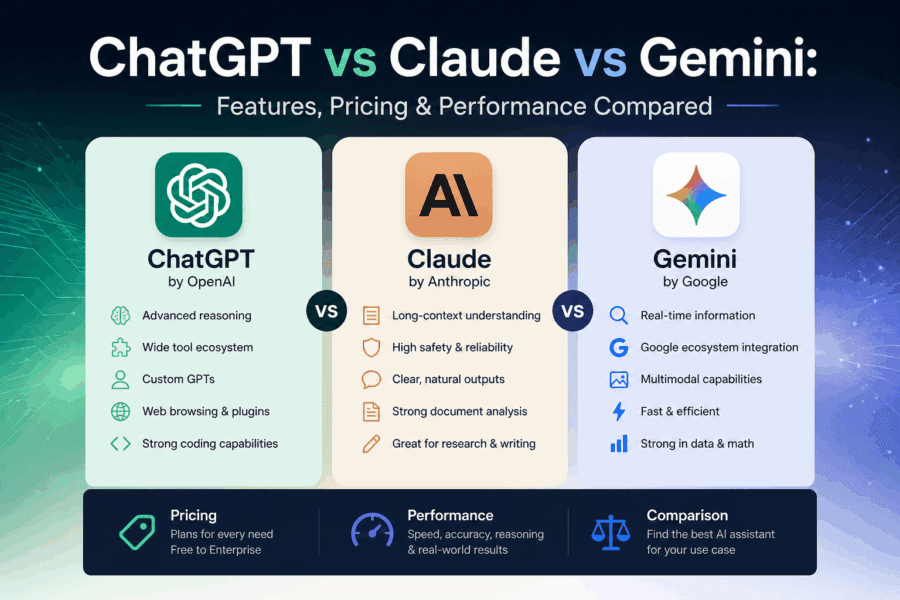

Let’s be honest, picking an AI assistant in 2026 feels a little like walking into an ice cream shop that keeps adding new flavors every week. ChatGPT, Claude, Gemini… they all look impressive on the surface; they all claim to be the smartest, and they all want to be your go-to digital brain. But they’re not the same, and depending on your needs, one will suit you better than the others.
I’ve used all three for writing, coding, research, and everyday questions, and this article is my honest take on where each shines, where it falls short, and what you’re actually getting for your money (or for free).
A quick intro to each AI
Before we dive into the comparison, here’s the 30-second version of each tool:
ChatGPT
Made by OpenAI. It was the one that started the AI chatbot craze. Runs on GPT-4o and now GPT-4.5. Known for its versatility and plugin ecosystem.
Claude
Made by Anthropic. Built with a safety-first philosophy. Excellent for long documents, nuanced writing, and thoughtful responses.
Gemini
Made by Google. Deeply integrated with Google’s ecosystem, Search, Drive, and Docs. Strong at real-time web info and multimodal tasks.
Features compared
ChatGPT — the all-rounder
ChatGPT is still the most feature-rich of the three, especially if you’re on the paid plan. (If you want a more profound look at how it’s evolving, check out how AI conversations are shaping the future.) You get image generation via DALL·E, a built-in code interpreter, voice mode, memory (it actually remembers things between conversations), custom GPTs you can build and share, and a massive library of third-party integrations. It’s the Swiss Army knife of AI tools.
The free tier has gotten much more generous over the years; you get access to GPT-4o, which is impressive. But ChatGPT Plus ($20/month) locks the heavier features like memory, longer context windows, and the latest models behind a paywall.
What I genuinely like about ChatGPT is how fluid the experience feels. Its long presence indicates that the interface is polished, the ecosystem is massive, and it rarely feels clunky. If someone asked me to recommend one AI for someone who’s never used one before, I would start with ChatGPT.
Claude — the thoughtful one
Claude is a different kind of AI. Where ChatGPT feels like a very capable assistant that’s eager to help, Claude feels more like a calm, intelligent colleague who actually thinks before responding. The answers tend to be more nuanced, and it’s noticeably better at avoiding hallucinations, that annoying habit AI tools have of confidently making things up.
One of Claude’s real strengths is handling long documents. Its context window is massive; Claude can read and analyze an entire research paper, a long contract, or even a book chapter without losing track of earlier details. If you work with large text files regularly, its capability alone makes it worth trying.
The writing quality is also exceptional. Claude’s output doesn’t sound robotic or over-structured. It has a natural flow that’s difficult to match. For blog posts, emails, creative writing, or any task where tone matters, Claude consistently performs well.
Gemini — Google’s connected AI
Gemini’s biggest differentiator is its tight integration with Google’s ecosystem. (It’s also driving major changes in mobile AI experiences.) If you live in Google Workspace Docs, Gmail, Drive, or Calendar, Gemini feels almost like a natural extension of those tools. It can pull context from your emails, summarize documents in your Drive, or draft a reply based on an email thread without you copy-pasting anything.
Gemini is also genuinely good at real-time information. Unlike ChatGPT and Claude, which can struggle with very recent events, Gemini has direct access to Google Search, which means it’s usually more up-to-date. For news, current data, or anything time-sensitive, this matters.
That said, Gemini sometimes feels like it’s playing catch-up in pure conversational depth. It’s smart, but it can lean on bullet points and structured formatting a bit too aggressively. Sometimes you just want a natural answer, not a five-point summary.
Pricing breakdown
Here’s what you’ll actually pay:
ChatGPT
- Free: GPT-4o with limits
- Plus: $20/month — full access, memory, DALL·E, voice
- Team: $30/user/month
- Enterprise: Custom pricing
Claude
- Free: Claude Sonnet with daily limits
- Pro: $20/month — more usage, priority access, projects
- Team: $30/user/month
- Enterprise: Custom pricing
Gemini
- Free: Gemini 1.5 Flash
- Advanced: $20/month (via Google One) — Gemini 1.5 Pro, Workspace integration
- Business/Enterprise: From $30/user/month
Honestly, at the $20/month price point, all three are competitive. You’re not overpaying for any of them; the question is just which one earns that $20 for your specific use case.
Performance in real-world tasks
Writing and content creation
Claude wins this category for me. The prose quality is genuinely better; it doesn’t pad responses unnecessarily, it picks up on tone well, and long-form content feels coherent from start to finish. ChatGPT is a strong contender, especially with custom instructions. Gemini works but tends toward structured, listicle-style output even when you don’t ask for it.
Coding and technical tasks
ChatGPT and Claude are neck and neck here, with ChatGPT edging ahead slightly thanks to its code interpreter and ability to actually run and debug code within the chat. Claude is excellent at explaining code and catching logical errors. Gemini is decent but not the first choice for serious development work.
Research and fact-checking
Gemini wins this comparison, primarily due to its integration with Google Search. For anything that happened in the last few months, or any question where having current data matters, Gemini is more reliable. ChatGPT with web browsing enabled is a solid alternative. Claude is the most careful about saying “I’m not sure,” which is actually a feature, not a bug, but it can feel limited when you need current information.
Document and PDF analysis
Claude is the clear winner. Its context window is enormous, and it handles long, complex documents with a level of detail the others struggle to match. If you’re a lawyer, researcher, academic, or anyone who regularly needs to pull insights from dense text, Claude is built for you.
Multimodal (images, voice, video)
ChatGPT leads here; it can generate images, analyze them, respond by voice, and interact with more media types than the others out of the box. Gemini is making rapid progress, especially in video understanding. Claude handles images but doesn’t generate them, and its voice capabilities are more limited.
Which one should you actually use?
Here’s the straightforward version:
If you want the most features and the biggest ecosystem, go with ChatGPT. It’s the safest all-around choice, especially if you use a variety of tasks and don’t want to think too hard about which tool to pick.
If you do a lot of writing, document analysis, or work that requires careful, nuanced thinking, Claude is worth switching to or at least using alongside ChatGPT. The quality of output in language-heavy tasks is genuinely noticeable.
If you’re already deep in Google’s ecosystem, or you frequently need current, real-time information, Gemini Advanced makes a lot of sense. The Workspace integration alone can save significant time if Gmail and Docs are central to your workday.
And honestly? Nothing stops you from using more than one. Many people use ChatGPT for quick tasks, Claude for writing and documents, and Gemini for anything Google-related. AI tools are cheap enough at the personal level that combining two of them is still less than most software subscriptions.
ChatGPT vs Claude vs Gemini – FAQs
Common questions people have before choosing between ChatGPT, Claude, and Gemini.
There’s no single winner; it depends on what you need. ChatGPT is the most feature-rich and versatile. Claude is the best for writing, long documents, and nuanced reasoning. If you’re heavily invested in Google Workspace or need real-time web information, you should choose Gemini as your strongest option. Many power users actually keep two of them running side by side.
For most writing tasks, such as blog posts, essays, emails, and creative content, Claude tends to produce more natural, human-sounding prose. It avoids the over-structured, bullet-heavy style that AI tools often default to. ChatGPT is very capable too, especially with custom instructions, but Claude has a slight edge in tonal consistency and flow for long-form writing.
Yes, all three offer free tiers. ChatGPT’s free plan provides you with access to GPT-4o with usage limits. Claude’s free plan lets you use Claude Sonnet daily with a cap on messages. Gemini’s free tier offers access to its standard model. The paid plans ($20/month for all three) unlock higher usage limits, more powerful models, and additional features.
ChatGPT is slightly ahead in coding because of its built-in code interpreter; it can actually run and test code within the chat, not just write it. Claude is excellent at explaining logic, reviewing code, and spotting errors. For serious development workflows, many developers use Claude Code (the command-line tool) alongside ChatGPT depending on the task.
Yes. Gemini has direct integration with Google Search, which means it can pull in real-time information when answering questions. This provides it a meaningful advantage for news, current events, prices, and anything time-sensitive. ChatGPT also has web browsing on paid plans, but Gemini’s search integration tends to feel more seamless.
Claude is built by Anthropic with a strong emphasis on safety and responsible AI. For business use, Claude’s Team and Enterprise plans include stronger data privacy controls, and conversations are not used to train models by default on those plans. That said, you should always review the privacy policy of any AI tool before sharing genuinely sensitive data. This rule applies to all three.
Claude is the clear choice here. It has one of the largest context windows of any commercially available AI, meaning it can read and reason about very long documents, including entire research papers, legal contracts, or lengthy reports, without losing track of earlier details. If document analysis is a core part of your work, Claude’s capabilities in this area are genuinely ahead of the competition.
ChatGPT has a memory feature (on paid plans) that can remember things across sessions: your name, preferences, ongoing projects, etc. Claude has a memory feature available in its settings that works similarly. Gemini also has memory capabilities, particularly useful when connected to your Google account. All three handle within-session context well; cross-session memory varies by plan and settings.
Is paying $20/month for any of these worth it?
If you use AI tools regularly for work writing, research, coding, or analysis, yes, $20/month is very reasonable. You get significantly higher usage limits, access to the most powerful model versions, and features like memory, longer context, and integrations that make a real difference day-to-day. The free tiers are decent enough for casual use, but if AI is part of your daily workflow, the paid plan pays for itself quickly.
Gemini, without question. It’s built into Google Workspace; it can read your Gmail, summarize documents in Drive, help draft responses, and integrate directly into Docs and Sheets. If your work revolves around Google’s tools, Gemini Advanced ($20/month via Google One) offers the tightest integration and the most seamless experience of the three.
Before choosing a tool, it’s worth understanding how AI is reshaping everyday life and work.
Final verdict
There’s no universally “best” AI chatbot; that’s the honest answer. ChatGPT is the most well-rounded. Claude is the most refined for writing and reasoning. Gemini is the most connected. Each has earned its place.
What matters is matching the tool to the job. And the best way to figure that out? Try the free tiers of all three. Spend a week with each, use them for the actual work you do every day, and let your experience decide. You’ll know pretty quickly which one fits.