

AMD has been ahead of Intel for a while now. Specifically, this has been the case since the X3D chips arrived and began outperforming everything Intel had in gaming performance. The gap isn’t even close in some titles.
But here’s the thing: picking the right AMD CPU is still confusing. Do you go with AM5 or stick with AM4? X3D or standard? Ryzen 7000 or 9000? Budget or flagship?
This guide cuts through it. Whether you’re building fresh, upgrading an existing system, or just trying to figure out what is actually a good CPU for gaming right now without spending more than you need to, this guide covers everything.
Why AMD Dominates Gaming CPUs in 2026
The short version: 3D V-Cache.
AMD’s X3D technology stacks extra cache directly on top of the CPU die. More cache means the processor can store more game data closer to the cores, which reduces latency and keeps frame rates higher and smoother, especially in CPU-heavy scenarios.
The Ryzen 7 9800X3D averages 12 to 18% higher minimum frame rates compared to the standard 9800X at 1440p. Against equivalent Intel chips, the gap is even more pronounced in most gaming workloads.
This isn’t just benchmark padding either. Real-world gaming in open-world titles like Cyberpunk 2077, Starfield, and Microsoft Flight Simulator sees the biggest gains from V-Cache, as those games constantly stress the CPU. Frame pacing improves noticeably, not just average fps.
Intel has made strides with its Arrow Lake Refresh lineup. The Core Ultra 7 270K Plus and 250K Plus are genuinely competitive at their price. But for pure gaming, AMD’s X3D chips still win.
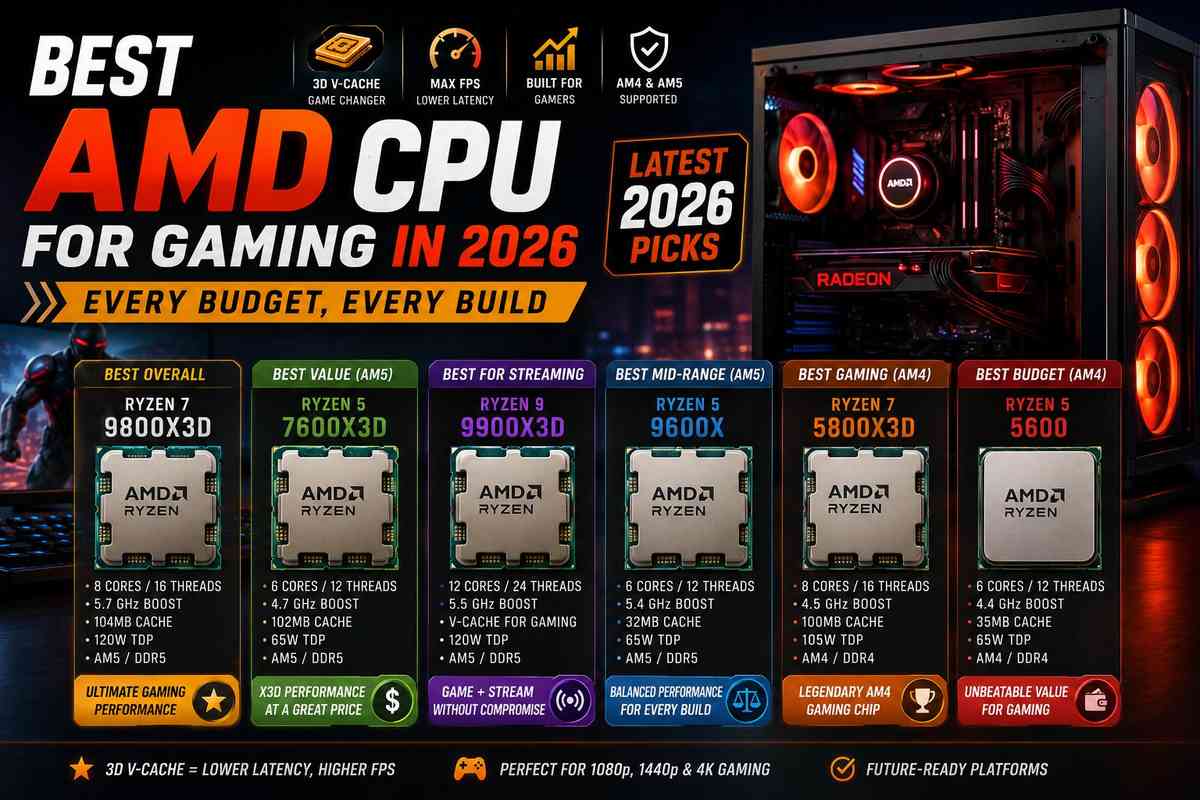
Quick Answer: Which AMD CPU Should You Buy?
Before we look at individual picks, here’s a quick summary by use case:
- Best overall: Ryzen 7 9800X3D
- Best value on AM5: Ryzen 5 7600X3D
- Best for gaming + streaming: Ryzen 9 9900X3D
- Best budget AM4: Ryzen 5 5600
- Best AM4 gaming CPU: Ryzen 7 5800X3D
- Best mid-range AM5: Ryzen 5 9600X
Now the full breakdown.
Best AMD CPU for Gaming Overall: Ryzen 7 9800X3D
If you read only one section, let it be this one.
The Ryzen 7 9800X3D is the best gaming CPU money can buy right now. It’s not just the best AMD CPU. The best CPU period, from any manufacturer, at any price.
It uses Zen 5 architecture combined with second-generation 3D V-Cache, stacking 96MB of L3 cache on top of the die. That combination of next-gen cores and next-gen cache is something AMD hadn’t done before the 9800X3D. Previous X3D chips used older Zen revisions under the stacked cache. The 9800X3D gets both advantages at once.
Specs:
- 8 cores / 16 threads
- 5.7 GHz boost clock
- 104MB total cache (including 64MB 3D V-Cache)
- 120W TDP
- AM5 socket, DDR5 only
Gaming performance: Flat out dominant. In CPU-limited scenarios at 1080p and 1440p, nothing touches it. Even at 4K, where the GPU is usually the bottleneck, the 9800X3D’s frame pacing improvements are noticeable in busy open-world scenes.
The only downside: It runs hot. Peak temps of 85 to 90°C are normal under gaming load. Don’t pair it with a 120mm cooler. A 240mm AIO is the minimum; a 360mm is better if your case supports it.
Price context: The Ryzen 7 9850X3D launched recently and is technically 3.3% faster than the 9800X3D. But it costs about 6% more for that gain. The 9800X3D is better value unless you genuinely need every last frame.
Best Value AMD Gaming CPU on AM5: Ryzen 5 7600X3D
The 7600X3D is what happens when AMD takes V-Cache tech and puts it on a budget chip.
Six cores, 12 threads, 4.7 GHz boost. On paper, nothing special. But with 102MB of combined L2/L3 cache, it beats the non-X3D Ryzen 5 7600X by 22% in gaming performance. That’s a huge jump for the same price tier.
Best for: 1080p and 1440p gaming where you want X3D performance without paying flagship prices.
The limitation: Six cores means multitasking headroom is limited. If you stream, render video, or run many background tasks while gaming, you’ll feel the squeeze. This is a gaming-first chip. For gaming only, it’s outstanding value.
Motherboard note: The 7600X3D uses the AM5 socket. Any X670, X670E, B650, X870, or X870E board works, though older boards may need a BIOS update first.
Best AMD CPU for Gaming + Streaming: Ryzen 9 9900X3D
Streaming while gaming is a genuinely different workload from pure gaming. You need cores for OBS encoding while also providing the GPU with enough data for smooth frame rates.
The Ryzen 9 9900X3D is the answer to that. 12 cores with V-Cache means the extra cores handle OBS NVENC or x265 encoding while the cached cores focus on the game. In testing, running a game alongside OBS at 1080p60 software encoding still kept all-core utilization under 70%.
Specs:
- 12 cores / 24 threads
- V-Cache for gaming performance
- AM5 socket
Gaming performance: Within 1 to 2% of the 9800X3D in benchmarks. You’re not giving up gaming performance to get the extra cores.
Who should skip it: If you only game and never stream or create content, the 9800X3D is a better value. The 9900X3D costs more for a core count you won’t use.
Best Mid-Range AMD Gaming CPU: Ryzen 5 9600X
Not everyone needs X3D. The standard Ryzen 5 9600X is a legitimate recommendation for mid-range builds where the budget needs to go toward a better GPU.
It has six cores, uses Zen 5 architecture, and has a 65W TDP. It runs cool, it’s easy to cool with basic air coolers, and it doesn’t bottleneck any GPU up to the RTX 5070 level at 1440p in most games.
Best for: Builds where the GPU is the priority and the CPU budget is under $200.
vs. Ryzen 5 7600X3D: The 7600X3D wins at gaming. The 9600X costs similarly but offers Zen 5 IPC improvements and slightly better productivity performance. If gaming is your priority, go with the 7600X3D. For a balanced chip that can handle a bit of everything, the 9600X is the one to get.
Best Budget AMD CPU for Gaming: Ryzen 5 5600
The Ryzen 5 5600 is one of those chips that just refuses to become irrelevant.
It’s AM4, DDR4, and based on Zen 3 architecture from 2020. In 2026, you can pick it up for under $100. Sometimes well under. Paired with an affordable B550 board and DDR4-3600 RAM, you have a platform that can run any GPU up to RTX 4070 without serious bottlenecking at 1080p and 1440p.
Specs:
- 6 cores / 12 threads
- 4.4 GHz boost
- 65W TDP
- AM4 socket, DDR4
Why it’s still relevant: AM4 motherboards are cheap. DDR4 RAM is cheap. If you’re on a tight budget in 2026, a completely valid strategy is to start with a Ryzen 5 5600 on a B550 board and invest the money you save into a better GPU.
The tradeoff: You’re building on a platform with no upgrade path beyond Ryzen 5000. If you want to eventually move to Ryzen 9000 or whatever comes after AM5, you’ll need a new board. AM4 is a terminal platform.
Best AM4 Gaming CPU: Ryzen 7 5800X3D
If you have an AM4 board and are considering upgrading the CPU or switching to AM5, this section is for you.
The Ryzen 7 5800X3D is the best gaming CPU you can put in an AM4 motherboard. 96MB of 3D V-Cache gives it gaming performance that rivals Ryzen 7000 series chips despite being based on older Zen 3 architecture. It regularly beats the non-X3D Ryzen 7900X in gaming benchmarks.
In 2026: Prices have dropped to a point where the 5800X3D is arguably the best deal in gaming CPUs if you have an AM4 board. You upgrade one component and get a significant performance jump without touching your motherboard, RAM, or cooler.
Cooling: Runs cooler than most people expect. A decent 240mm AIO or a good dual-tower air cooler is more than enough.
vs. AM5 upgrade: Building an AM5 system costs more upfront because of the new motherboard and DDR5 RAM requirement. If your current AM4 board is healthy and your RAM is decent DDR4-3600 or faster, the 5800X3D is the smarter short-term move. If you’re building a new system, AM5 is the better choice.
AM4 vs AM5 in 2026: Which Platform Should You Build On?
This is the question that comes up constantly, and the answer depends on your situation.
Build on AM5 if:
- You’re building from scratch with no existing components
- You want the best gaming performance available (9800X3D)
- You plan to keep this PC for 4 to 5+ years
- You’re pairing it with an RTX 4080 or better
AMD confirmed AM5 socket support through at least 2027, with a strong likelihood of extending further. Zen 6 (expected late 2026) will use AM5. Buying AM5 right now means buying into a platform that still has upgrade headroom.
Stick with AM4 if:
- You already have an AM4 board in good condition
- Your budget is tight and the money saved on platform costs can go toward a better GPU
- You’re doing a targeted upgrade and not rebuilding everything
- You’re comfortable with DDR4 RAM you already own
AM4 is getting no new CPUs. The 5800X3D is the ceiling, though. But that ceiling is still genuinely solid in 2026, and the platform costs are low.
The honest take
For new builds in 2026, AM5 is the best choice. The platform has longevity, the performance is better, and DDR5 prices have come down from their ridiculous 2022 highs.
For upgrades to existing AM4 systems, the 5800X3D is one of the best value moves in PC gaming right now. Don’t feel pressured to jump to AM5 just because it’s newer.
What Makes a Good Gaming CPU in 2026?
People often over-focus on core counts when buying a gaming CPU. More cores sound better. In practice, gaming performance is driven by something different.
Single-core performance matters most
Most games run primarily on one or two CPU cores. The speed of those cores determines how quickly the CPU can process game logic, physics, and AI. Higher clock speeds and better IPC (instructions per cycle) directly improve gaming performance.
This is why a 6-core Ryzen 5 9600X can outperform a 16-core workstation chip in gaming. More cores don’t help when the game isn’t using them.
Cache is increasingly important
The X3D chips proved their worth. A larger, faster cache allows the CPU to access game data without relying on slower RAM. In cache-sensitive titles, the performance difference is dramatic.
Don’t bottleneck your GPU
The other side of CPU selection is making sure you’re not limiting your graphics card. A weak CPU paired with a high-end GPU is a bottleneck. You’re paying for GPU performance you can’t actually use.
A rough guide: the Ryzen 5 5600 and 9600X can comfortably handle GPUs up to the RTX 4070/5070 tier. For RTX 4080/5080 builds, you want a Ryzen 7 9800X3D or similar. If you’re unsure how to pair components, our ultimate guide to buying a gaming PC covers the whole build process.
AMD CPU and RAM: What You Need to Know
AMD Ryzen processors are more sensitive to RAM speed than Intel chips because of how the Infinity Fabric interconnect works.
For AM5 (Ryzen 7000/9000), DDR5-6000 is the ideal choice. This frequency syncs well with the Infinity Fabric clock and provides the best gaming performance. Going above DDR5-6400 offers little benefit for most users.
For AM4 (Ryzen 5000), DDR4-3600 is the best choice. The same logic applies to the fabric clock.
Always enable XMP or EXPO in your BIOS after installing RAM. By default, your board will run RAM at base JEDEC speeds (DDR4-2133 or DDR5-4800), leaving performance on the table. One BIOS toggle resolves the issue.
Our DDR5 vs DDR4 guide covers the full comparison if you’re deciding between platforms and want to understand how RAM choice affects your build. And if you’re unsure how much RAM your gaming setup needs, our RAM for gaming guide breaks it down clearly.
The ASRock B550 Phantom Gaming 4: A Solid AM4 Budget Board
If you’re going the AM4 route with a Ryzen 5000 CPU, the ASRock B550 Phantom Gaming 4 is worth knowing about. It’s a reliable B550 motherboard that supports the full Ryzen 5000 lineup, including the 5800X3D; has PCIe 4.0 for both GPU and M.2 storage; and comes in at a price that leaves more budget for the CPU and GPU.
It’s not a flashy board. No unnecessary RGB overload, decent VRMs for the Ryzen 5 and 7 chips it’s designed for, and stable performance. For a budget or mid-range AM4 build in 2026, this board does the job without draining your wallet.
How to Get More Performance From Your AMD CPU
Getting your AMD chip running at its full potential takes a few steps beyond just plugging it in.
Enable EXPO or XMP in BIOS. As mentioned above, this step is the single most impactful software tweak you can make. Takes two minutes and gives you the RAM performance you paid for.
Update your BIOS. AMD regularly releases BIOS updates that improve performance, stability, and compatibility. This is especially relevant if you’re putting a newer CPU into an older board.
Use AMD’s Precision Boost Overdrive (PBO). PBO lets the CPU boost higher than stock for longer periods. It’s in the BIOS under AMD Overclocking settings. For X3D chips specifically, AMD recommends a conservative PBO approach since the V-Cache die limits how far you can push clocks safely.
Make sure your cooler is adequate. Underperforming cooling causes thermal throttling, which cuts into performance. The 9800X3D and 5800X3D both run hot enough that a basic 120mm cooler will limit you.
For broader PC performance tuning beyond just the CPU, our gaming PC optimization guide covers Windows settings, driver configurations, and other tweaks that make a real difference.
AMD CPU Comparison Table
|
CPU |
Platform |
Cores |
Best For |
Approx. Price |
|
Ryzen 7 9800X3D |
AM5 |
8 |
Best overall gaming |
~$420 |
|
Ryzen 7 9850X3D |
AM5 |
8 |
Slightly faster, costs more |
~$450 |
|
Ryzen 9 9900X3D |
AM5 |
12 |
Gaming + streaming |
~$550 |
|
Ryzen 5 9600X |
AM5 |
6 |
Mid-range balanced |
~$200 |
|
Ryzen 5 7600X3D |
AM5 |
6 |
Value X3D gaming |
~$220 |
|
Ryzen 7 5800X3D |
AM4 |
8 |
Best AM4 gaming |
~$180 |
|
Ryzen 5 5600 |
AM4 |
6 |
Budget builds |
~$90 |
Prices vary by retailer and region. Check current pricing before buying.
Frequently Asked Questions
The Ryzen 7 9800X3D. Nothing from AMD or Intel matches it for pure gaming performance at its price point.
If you have an existing AM4 board, upgrading to a Ryzen 7 5800X3D is excellent value. For new builds, the AM5 platform is the better long-term choice.
Ryzen 7 5800X3D. It’s the ceiling of AM4 gaming performance, and prices have come down significantly in 2026.
Ryzen 5 5600 for AM4 builds under $100, or Ryzen 5 9600X for AM5 mid-range builds around $200.
Yes, the Ryzen 7000 and 9000 series require DDR5. AM4 (Ryzen 5000 and older) uses DDR4 only.
For most people, yes. The 9850X3D is only 3.3% faster but costs around 6% more. The 9800X3D is better value unless you want every last frame and your budget isn’t a concern.
Any AM5 motherboard works: X670, X670E, B650, X870, or X870E. Older X670 and B650 boards may need a BIOS update. Newer X870 boards are plug-and-play with Ryzen 9000.
Six cores is sufficient for most games in 2026. Eight cores provides more headroom for multitasking and future titles. Going above eight cores only helps if you stream or do content creation alongside gaming.
Not necessarily for raw gaming performance, though. AMD CPUs work fine with NVIDIA GPUs. The main AMD-specific advantage is Smart Access Memory (SAM), which works when you have both an AMD CPU and AMD GPU, giving a small performance boost in some games.
Last updated: June 2026