
Sixty-six percent of businesses have automated at least one process, according to the latest available data. Yet a significant share of those automation projects quietly fail, not because the software malfunctioned, but because the automation’s purpose was poorly defined from the outset.
Automation is not a fix. It is a multiplier. Point it at a well-defined, efficient process and you get speed and scale. Point it at a broken or poorly understood workflow, and you get a faster, more consistent version of the same problem.
This guide shows you exactly how to identify which business processes are worth automating, how to define them clearly enough that automation actually works, and how to measure whether operational efficiency genuinely improved after you deploy.
The real reason most automation projects underdeliver
When companies decide to automate, the impulse is almost always to go straight to tools. Which platform should we use? How quickly can we connect our systems? How long until we see ROI?
These are the wrong first questions.
A Salesforce survey found that mapping complex processes is a challenge for over 54% of organizations implementing business process automation. That is not a technology problem; it is a documentation and definition problem. The tool does not know your business. It can only follow the instructions you give it. If those instructions are vague, incomplete, or based on how you wish the process worked rather than how it actually works today, the automation will fail or produce unpredictable results.
There is also a subtler failure mode that is rarely discussed: automating a process that should not exist in its current form. Every organization accumulates processes that once made sense but have outlived their original purpose, such as approval chains for decisions that no longer carry risk, data transfers between systems that could be integrated directly, and annual checks that exist because a system once had a bug that was fixed years ago. When you automate these processes without examining them first, you permanently embed historical inefficiency into your operations. It becomes invisible, unquestioned, and very difficult to remove later.
Companies that consistently achieve a 30% to 200% ROI from automation in their first year, along with research showing that 60% achieve ROI within 12 months, are the ones that treat process definition as core work rather than as a preamble to it.
What makes a business process genuinely automatable
Not every process is a suitable candidate, and learning to distinguish between them saves considerable time and money.
A process is well-suited for automation when it shares most of the following characteristics:
It is repetitive and high-frequency. The task happens regularly daily, weekly, or with every new customer, transaction, or request. The ROI from automating a task that happens twice a year is minimal. The ROI from automating a task that runs 200 times a day compounds quickly. Frequency is your most important filter.
It follows clear, consistent decision rules. Every branch point in the process has a rule that determines which path to take, and that rule does not require judgment, relationship context, or interpretation. “If the invoice is under $500, auto-approve. If it is over $500, route to the finance manager.” A human following this rule is not adding value; they are just executing logic that a system can handle.
It is prone to human error. Manual data entry, copy-paste between systems, and repetitive form-filling are areas where humans make small, expensive mistakes. Research consistently shows that automation reduces errors by 40 to 75% in rule-based processes. If your team regularly spends time correcting or cleaning up the output of a task, that task is a strong candidate for automation.
It consumes significant time relative to its value. If a task takes 45 minutes of a skilled employee’s time but delivers no strategic value, just moving data from one place to another, then that 45 minutes is worth redirecting. IT leaders report that automation saves roughly 50% of the time previously spent on IT tasks, according to a recent industry survey.
The inputs and outputs are already digital. Automation works by reading, writing, and transferring data. The processes that begin with structured digital inputs—form submissions, database records, and file uploads—are straightforward to automate. Processes that begin with a phone call, a handwritten note, or a judgment made from experience require significantly more complexity to handle.
Processes that do not automate well
Some work genuinely needs humans, and automating it either fails outright or produces worse outcomes than the manual version.
- Decisions that require empathy, relationship context, or reading between the lines (escalated complaints, difficult conversations with clients, performance feedback)
- Creative or strategic judgment anything where “it depends” is the honest answer
- Processes whose rules change frequently enough that maintaining the automation costs more than the manual alternative
- Situations where an incorrect automated decision carries serious consequences and the validation logic cannot be made reliable
Partially automating these processes, managing the administrative shell while preserving human decision points, is often the best compromise.
The three levels of business process automation
“Automation” is used as a single concept but encompasses meaningfully different levels of complexity. Understanding which level fits your process determines which tools and approaches to use.
Level 1: Task automation
A single, isolated task is automated without connecting to a larger workflow. An email confirmation is sent automatically when a form is submitted. A file moves to the correct folder when it matches a naming pattern. A report generates on a schedule.
Task automation is the lowest-effort, highest-reliability starting point. The scope is narrow, failure modes are straightforward to predict, and implementation is quick with workflow automation tools like Zapier, Make, or Microsoft Power Automate; no engineering resources are required. Start here to build confidence and demonstrate early wins.
Level 2: Workflow automation
A connected sequence of tasks across multiple steps and systems is automated as a single flow. An employee submits an expense report, triggering an approval request to their manager, which, if approved, triggers a payment entry in accounting and an update in the HR system. Four systems, one automated workflow, zero manual handoffs.
This process is where most organizations achieve their greatest efficiency gains. IT departments report the highest ROI from automation at 52%, followed by operations at 47%, customer service at 37%, and finance at 30%, according to a Salesforce survey. Multi-step workflow automation is precisely what drives results in these departments. If you need external help implementing at this level, explore business process automation services that specialize in end-to-end workflow design and deployment.
Level 3: Intelligent process automation
Workflow automation combined with AI is able to handle variable inputs, make context-sensitive decisions, and improve over time. Classifying incoming support tickets by urgency and sentiment. This involves extracting structured data from unstructured documents like contracts or invoices. Personalizing outbound communications based on customer behavior patterns is essential.
Intelligent automation is significantly more complex to implement and requires clean, well-structured data to function reliably. For organizations that are not yet automating systematically, it is not clear where to start. Build discipline and proven processes at Levels 1 and 2 first. When you are ready, our guide on BPM automation and intelligent automation covers exactly how to make that transition.
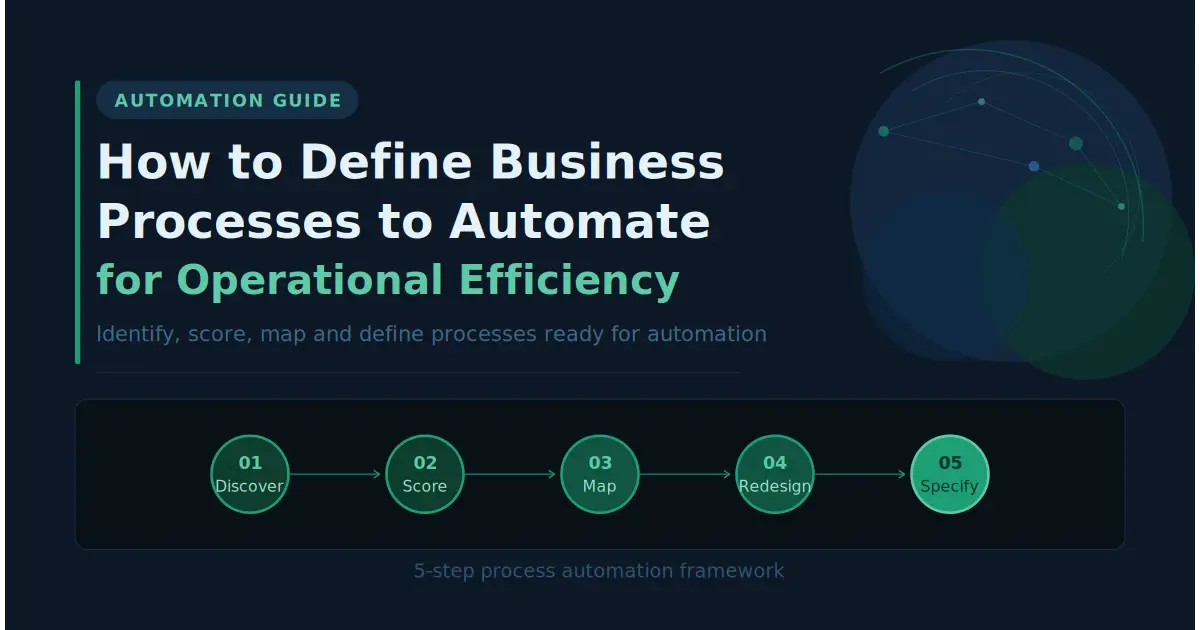
How to define business processes to automate: a complete framework
Step 1: Run a structured process discovery audit
Do not start at the laptop. Start by talking to people.
Schedule 30-minute conversations with team leads across each department: operations, finance, HR, sales, customer support, and IT. Ask the same questions in every conversation:
- What tasks does your team do repeatedly that feel like they should be automated?
- Where do things slow down, pile up, or wait for someone to take action?
- What are the most common mistakes your team fixes on a regular basis?
- Are there any spreadsheets, email threads, or workarounds your team uses that were built to compensate for a gap in your systems?
That last question is especially important. Every organization has informal workarounds: a spreadsheet someone built three years ago that the whole team now relies on, a manual copy-paste step that exists because two systems were never properly integrated, and a weekly email someone sends because the reporting system never got configured correctly.
These workarounds are critical information. If you automate the official process and ignore the real one, your automation will break immediately upon deployment or be silently ignored by your team.
After speaking with the managers, please have the same conversations with the frontline staff who actually perform the work. Managers describe how processes are supposed to work. Frontline employees know how they actually work. Both perspectives are necessary.
Step 2: Score every candidate process
Once you have your full list, score each process objectively before deciding where to start. This prevents the most common mistake in automation planning: starting with the most technically compelling process rather than the one that will deliver the most value.
Score each process across three dimensions:
|
Dimension |
Question |
Scoring |
|
Frequency |
How often does this process run? |
Daily = 3, Weekly = 2, Monthly = 1 |
|
Time cost |
How many total staff hours per week does it consume? |
5+ hours = 3, 2–5 hours = 2, Under 2 hours = 1 |
|
Error rate |
How often do mistakes occur that require correction? |
Frequently = 3, Sometimes = 2, Rarely = 1 |
Prioritize anything scoring 7 or above; these are your highest-value candidates, for whom automation will pay back quickly and visibly. Processes scoring 4 to 6 form your second wave. Below 4, deprioritize until you have built automation capabilities for higher-priority items.
Add one further filter: automation readiness. Is the trigger for this process digital and consistent? Are the inputs structured data? Are the rules at each decision point clear and stable? A process that scores 8 on the priority scale but relies on unstructured inputs or constantly changing rules may need preparation work before it is automation-ready.
Step 3: Map the process as it actually exists today
For every high-priority process, create an as-is process map before designing any automation. Document the current state workarounds, informal steps, and all.
A complete as-is process map captures:
Trigger. What exact event starts this process? Is it consistent and detectable by a system, or does a human currently decide when to initiate it?
Actors. Who or what performs each step? Is it always the same role, or does it vary based on conditions?
Steps in sequence. What happens, in precise order, from trigger to completion? Include every step, including the informal ones that are not in any official documentation.
Systems involved. Which tools, platforms, or databases are accessed at each step? What data is read or written?
Decision points. Where does the process branch? What specific condition determines which path is taken? Write the rule explicitly, not as a description but as a logical statement.
Outputs. What does the completed process produce? Where does that output go? How does the current workflow confirm that the process completed correctly?
Exceptions. What are the most common failure scenarios: missing data, approvals that do not arrive, or systems that are unavailable? How are these currently handled?
Walk through the map in a session with the people who actually perform the work. This process almost always surfaces steps that did not appear in initial interviews: a manual spot verification someone added because the system once made an error, a courtesy notification that became habitual, and a secondary spreadsheet that serves as the real source of truth despite what the system shows.
These hidden steps are exactly where automations break down in production. Identifying them during documentation takes one hour. Finding them after deployment costs significantly more.
Step 4: Redesign the process before you build
Most automation projects skip this step, and it is arguably the most important one.
Before automating the process you have just mapped, determine whether it should change first.
A thorough process audit almost always reveals inefficiencies that have nothing to do with automation: approval layers for decisions that no longer carry meaningful risk, redundant data entry steps where two systems that could be integrated are not, handoffs that exist because of how the organization was structured five years ago, and validation steps that exist because a now-fixed system bug once made them necessary.
Automating these inefficiencies does not eliminate them. It makes them faster, invisible, and permanent.
Take your as-is map and apply three questions to every step:
- Does this step need to exist at all? What would happen if it were removed?
- Does this decision point represent a genuine business rule, or is it a habit that has never been re-examined?
- Is there a simpler version of this process that produces the same output?
The redesigned version of the to-be process is what you will automate. You are not digitizing the past. You are building the right workflow for how your business should operate.
Step 5: Write a precise automation specification
Once you finalize your to-be process map, please translate it into a written specification. This document is what a developer, automation consultant, or no-code builder will follow. It should be precise enough that someone unfamiliar with your business could implement it correctly without asking a single clarifying question.
Every automation specification must define:
Trigger. The exact event that starts the automation. Not “when a form is submitted” but “when a new row is added to Sheet X in the form responses spreadsheet, column B is not empty, and column C contains the value ‘new request.'”
Input data. Every piece of information the automation requires, including its source, format, and what the automation should do if a required input is missing or malformed.
Decision logic. For every branch point, the precise rule is written as a logical statement. “If [field] = [value], then [action A]. Otherwise [action B].” Ambiguous rules produce unpredictable automation.
Actions. Every operation the automation performs at each step: which system, which record, which field, what value is written, what message is sent, and to whom.
Output. The final result is produced when the automation completes successfully.
- What record exists?
- What confirmation is sent?
- What status is updated?
Error handling. What happens when each possible failure occurs: retry, alert a human, log and continue, or fail and stop? Every failure mode should have a defined response, chosen deliberately rather than accepted as a default.
This specification document is also your maintenance reference. When the automation breaks (all automations eventually break), or when the underlying process changes and the automation needs updating, this document is what makes the fix possible without reverse-engineering what was originally built.
How to handle exceptions, the detail most automations skip
Exception handling is consistently where well-designed automations break down in production, and it is invariably underspecified during the design phase.
Every process has a happy path, the standard flow where inputs arrive correctly, systems respond as expected, and approvals come through on time. In practice, a significant percentage of instances will not follow the expected path. Data will be incomplete, systems will be temporarily unavailable, approvals will be delayed, and input formats will be inconsistent.
For each exception you identify, define a deliberate response:
Alert and pause. Stop the automation and notify a specific person to intervene manually. Use this option for exceptions that require human judgment or carry significant risk if handled incorrectly.
Retry with delay. Attempt the failed step again after a defined delay (5 minutes, 1 hour). Use this approach for transient failures like API timeouts or system unavailability.
Fallback path. Route the exception through a predefined alternative workflow. Use this approach for predictable edge cases that do not need human intervention but require different handling than the standard path.
Log and continue. Record the exception but allow the automation to proceed. Use this approach for minor issues that do not affect the output quality but should be tracked for later review and pattern analysis.
The completeness of your exception handling is directly proportional to how reliable your automation is in production. A system that handles the happy path smoothly but falls over on the first exception it encounters will quickly lose the trust of the team using it.
Measuring operational efficiency after automation
Deploying an automation without measuring its impact means you cannot demonstrate value, identify problems, or make the case for expanding automation to other processes.
Please establish your baseline measurements before launch so that your post-automation data have something to compare them to.
Cycle time is the most direct efficiency measure, the total elapsed time from when a process starts to when it finishes. If your invoice approval cycle took an average of four days manually and now takes six hours, that is a concrete, demonstrable efficiency gain. Measure average cycle time per instance in the four weeks before launch and at 30, 60, and 90 days after.
Error rate measures whether quality improved. Count errors, exceptions requiring manual correction, and rework incidents per 100 process instances before and after automation. For data handling and transfer processes, automation typically drives error rates toward zero. This is one of the strongest efficiency arguments for automation and one of the most straightforward metrics to quantify.
Staff hours recovered reveal the human cost of the original process and track whether that time is genuinely redirected. Calculate total manual time spent per week before automation. After deployment, please track where those hours are allocated. Hours recovered and redirected to higher-value work represent real operational efficiency improvement. Hours that simply disappear without redeployment represent a change management problem, not an efficiency gain.
Exception rate is specific to automation health. It measures how often your automation hits an unhandled exception or requires manual intervention in its first weeks of operation. A high early exception rate signals that your process mapping missed important edge cases. Treat it as useful diagnostic data: review every exception, identify the pattern, and update your specification and build accordingly.
Process definition template
Use the following template for every process before building its automation. Complete every field; if you cannot answer a section, that is a signal to investigate further before proceeding.
Process name: Process owner: Frequency: [How often does this process run?] Current time cost: [Average time per instance × instances per week = total weekly hours] Priority score: [Frequency + time cost + error rate from scoring above]
Trigger: [Exact event that starts this process]
Inputs required:
- Input 1: [Name · Source] · Format · Required or optional]
- Input 2: [Name · Source] · Format · Required or optional]
Process steps (as-is):
- [Step · Actor · System]
- [Step · Actor · System]
Process steps (to-be, after redesign):
- [Step · Actor · System]
- [Step · Actor · System]
Decision logic:
- If [condition], then [action]
- If [condition], then [action]
Expected output: [What is produced? Where does it go?]
Success confirmation: [How does the system or team know the process completed correctly?]
Known exceptions and handling:
- Exception 1: [What triggers it · How it is handled]
- Exception 2: [What triggers it · How it is handled]
Automation level: [Task / Workflow / Intelligent] Build approach: [No-code tool / Developer / Platform]
Frequently Asked Questions
Use the scoring system described above for frequency, time cost, and error rate. Prioritize processes that score 7 or above. For your first automation specifically, also choose a process that is self-contained (limited systems, clear trigger, and minimal exceptions) even if it is not the absolute highest scorer. A successful first automation builds internal confidence and provides you a working documentation template for everything that follows.
A process map describes what happens: the steps, actors, systems, and decision points. An automation specification translates the process map into precise build instructions, including exact triggers, data sources, logic rules, actions, outputs, and error handling. Both are necessary. The process map is for understanding and communication with stakeholders. The specification is for building.
Involve your team in the discovery audit and the process mapping sessions, not just in the rollout. Explain clearly what will change in day-to-day work, what will not, and what will happen to the time that gets freed up. Address the common anxiety directly: automation in this context is not replacing roles; it is eliminating the parts of the role that nobody actually wants to do. Teams that help design the automation adopt it. Teams that have it imposed on them discover workarounds.
Documenting how the process should work rather than how it actually works today. The official procedure documented eighteen months ago and the actual workflow your team runs today are almost never the same. Create the map based on observations and direct conversations, rather than relying on existing documentation. The gap between the two is precisely where automation projects fail.
Final Words
Defining your processes before automating them is not the exciting phase of the project. There are no product demos, no dashboards, no live content, and no announcements to make. It is structured conversations, careful documentation, and deliberate thinking about work that has probably been running on autopilot for years.
But it is the work that determines whether the automation succeeds. The organizations consistently seeing strong ROI from automation are not necessarily using better tools than those who struggle. They are using the same tools applied to better-defined processes.
Start with the definition. Everything else follows from it.