
Most people picture a flood when thinking about what a DDoS attack actually is, but attackers have evolved far beyond simple bandwidth exhaustion. And for years, that’s mostly what they were. But attackers got smarter. They stopped going after your pipes and started going after your brain, or more accurately, your application logic.
That’s exactly what a layer 7 DDoS attack does. And it’s arguably the most dangerous kind.
A Quick Refresher: The 7 Layers of a Network
Here’s some quick context before we get into it.
Networks don’t just magically move data from point A to point B. There’s a whole stack of processes underneath the OSI model that breaks it into seven layers. Think of them less as layers and more as handoffs. Each one has a specific job, and they pass the baton until a request reaches its destination.
Layer 7 is the last handoff. It is the one at the very top. It’s where HTTP lives, where your browser operates, where an API call gets made. When you hit Enter on a Google search, you’re working in layer 7. When someone logs into your app, that’s layer 7 as well.
This is precisely why attackers target it. If layer 7 fails, everything users see and do stops working, even if the rest of the network is completely fine.
What Is a Layer 7 DDoS Attack?
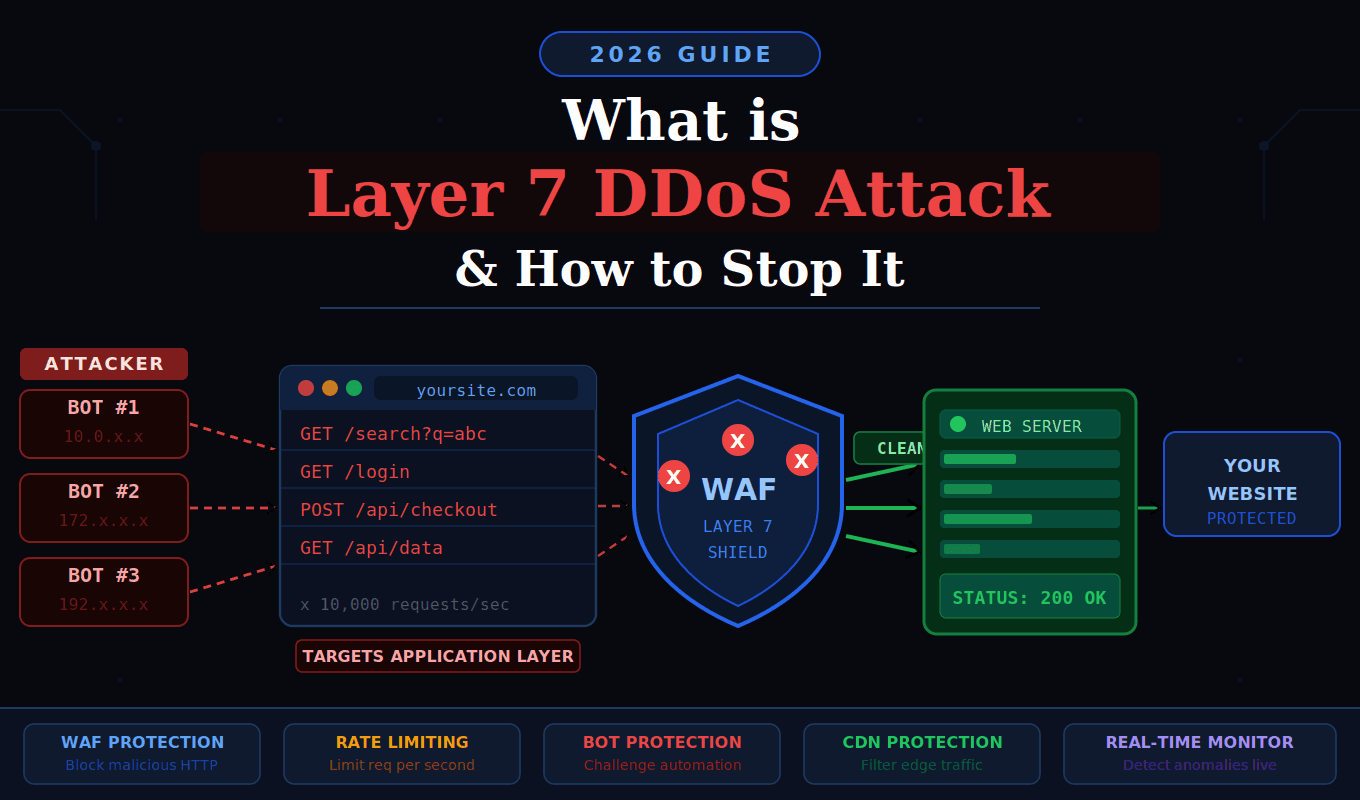
Put simply, a layer 7 DDoS attack goes after your application, not your network. Instead of trying to flood your bandwidth, attackers send requests that look completely normal but are built to make your server work incredibly hard until it runs out of steam.
Here’s the thing traditional DDoS attacks rely on volume. The more traffic, the more damage. Layer 7 flips that logic. You don’t need millions of requests if each one forces the server to run a complex database query, render a heavy page, or process a form submission. A few thousand well-aimed requests can do what millions of simple packets couldn’t.
A good analogy: imagine a customer who walks into a store and asks a staff member to check the stockroom for 50 different items, one at a time. They’re technically just shopping. But they’ve tied up your entire staff while real customers can’t get help. That’s what this attack does to your server.
What makes it genuinely tricky is that the requests often come from real devices on real IP addresses, i.e., botnets made up of compromised phones, routers, and computers around the world. To your server, it looks like a busy day. If you don’t know how to detect a DDoS attack early, the damage is often already happening before anyone notices.
Why Layer 7 Attacks Are So Dangerous
The real danger isn’t just disruption; it’s invisibility.
Volumetric attacks are noisy. Traffic spikes, alarms go off, and your team notices. Layer 7 attacks are quiet. The request volume might look totally normal. Your firewall might not alert you. Your CDN might not blink. Meanwhile, your application is quietly drowning.
There’s another angle here: it’s cheap to pull off. An attacker doesn’t need a massive botnet to take down a poorly protected web app. A few dozen machines sending targeted requests to your heaviest endpoints can be enough. The cost-to-damage ratio is deeply unfair.
For businesses running e-commerce stores, SaaS platforms, or financial services, even a few minutes of downtime can be very damaging. Lost sales, broken trust, and in some cases, regulatory headaches can result from such incidents. Attackers know this, and they use it.
Common Types of Layer 7 DDoS Attacks
Not every application layer attack works the same way. Here are the ones you’re most likely to encounter:
- HTTP GET/POST Flood: A straightforward approach. Attackers just hammer your server with HTTP requests. POST floods tend to be worse because the server actually has to process the submitted data, not just serve a page.
- Slowloris Attack: This one’s sneaky. Instead of sending a flood of complete requests, Slowloris opens several connections and keeps them alive by dripping in partial HTTP headers, never completing the request. The server sits there waiting. Connections fill up. Real users get blocked out.
- Cache-Busting Attacks: Caching is one of the easiest ways to keep a web server sane under load. Your server builds a page once, stores it, and hands out copies. Fast, efficient. Attackers know the score. So they tack a random string onto the end of every URL, something like this:
?ref=xk29zqand suddenly every request looks brand new. No cache hit. The server has to build each response from scratch, every single time. Multiply that by thousands of requests and you’ve got a serious problem.
- DNS Query Flood: Your web server might be perfectly healthy, but if nobody can find it, it doesn’t matter. That’s the logic behind DNS flood attacks. Rather than hitting your server directly, attackers dump a giant volume of fake queries onto your DNS resolver. Resolution bogs down. Users type in your domain and nothing loads. Your server is fine; your front door just stopped working.
- API Abuse: Experienced attackers skip the homepage entirely. They probe your application first and find the endpoints that are genuinely costly to run, such as a product search that hits the database, a login flow that runs multiple checks, and a report export that pulls thousands of rows, and they go straight for those. It’s surgical. And it works, because most teams never think to protect internal API routes the same way they protect their front page.
How to Stop a Layer 7 DDoS Attack
Anyone selling you a single product that “stops all DDoS attacks” is oversimplifying. Reality is messier. Effective protection comes from layering defenses and understanding how to prevent DDoS attacks before they escalate into outages.
1. Deploy a Web Application Firewall (WAF)
If you do only one thing on this list, please make it a WAF. A WAF lives between the internet and your server. Every HTTP request passes through it first. And unlike a regular firewall, which only cares about ports and IP addresses, a WAF actually reads what’s inside the request. It can spot when something’s off: too many requests from one source, headers that don’t make sense, payloads that match known attack patterns.
Cloudflare, AWS WAF, and Sucuri are the names that come up most. If you’re running anything public-facing and you don’t have a WAF yet, that’s the first thing to fix.
2. Use Rate Limiting
Rate limiting puts a cap on how many requests a single IP or session can make in a given time window. On its own, it won’t stop a fully distributed attack, but it raises the cost significantly and keeps things manageable during smaller bursts. Stack it with your WAF and it becomes a lot more effective.
3. Add CAPTCHA and Bot Challenges
Bot challenges work best at friction points: login pages, registration forms, checkout flows, and search bars. You’re essentially asking traffic to prove it’s human before the server does any heavy lifting. Modern challenge systems are nearly invisible to real users but stop most automated tools cold.
4. Get Behind a CDN with DDoS Protection
A CDN’s job isn’t just speed. When you route traffic through a CDN, your origin server essentially goes into hiding. Attackers can only reach the CDN’s edge nodes, not you directly. Providers like Cloudflare, Akamai, and Fastly process billions of requests and have seen attack patterns you’d never even imagine. Their mitigation runs automatically. By the time a request reaches your server, you have already screened it.
5. Watch Your Traffic in Real Time
Know what normal looks like for your site. Set baselines for typical request volumes, session lengths, error rates, and geographic distribution. When something drifts outside those norms, you want to know about it immediately, not an hour later when users are already complaining. Real-time anomaly detection gives you that head start.
6. Lock Down Your Expensive Endpoints
Please conduct a thorough audit of your application. Which pages or API calls are the most resource-intensive? Search functions? Report generators? Authentication endpoints? Adding rate limits, requiring authentication, and paginating large responses make it difficult for attackers to use those endpoints as leverage.
7. Build an Incident Response Playbook
When an attack hits, you want pre-made decisions, not panic. Who gets called? What gets isolated? What’s the rollback plan? A simple, documented playbook can cut your response time dramatically. Run through it before you need it.
Frequently Asked Questions
Think of it this way: layers 3 and 4 attacks are blunt instruments. They’re trying to drown your network in raw traffic. If your bandwidth maxes out, nothing gets through. Layer 7 is more calculated. The traffic volume might be totally normal, but each request is designed to make your server do something expensive. That’s what makes it harder to catch; your monitoring tools might not react even while your application struggles to keep up.
Not really, no. A regular firewall checks things like source IP and destination port. It has no idea what’s in the HTTP request itself, whether it’s a real user loading a page or an attacker hammering your search API 10,000 times a minute. For application-layer threats, you specifically need a WAF that can actually read and evaluate request content.
The short answer is they’ve had years to get good at it. Most layer 7 attacks don’t come from a single server with an obvious IP. They come from botnets: thousands of ordinary devices, including home routers, old Android phones, and forgotten office computers, that have been quietly infected and are now following orders without their owners knowing. Each device has a real IP address from a real location. To your server, it looks like regular users from around the world. On top of that, the requests are built to behave like real browser traffic, with proper headers and cookies. There’s no blinking neon sign that says “this is an attack.”
Less than you’d think for most setups. Basic Layer 7 protection comes bundled with a lot of CDN and hosting plans. If you need advanced bot management, custom WAF rules, and dedicated support, costs go up, but even then, weigh it against the revenue you’d lose in a few hours of downtime. For most businesses, the difference is significant.
Honestly, it varies a lot. Some attacks are over in minutes; they’re designed to test your defenses, cause a quick disruption, or just prove a point. Others grind on for hours or days, usually when there’s money or politics involved. What I’d say is this: don’t get too focused on duration. Even a 15-minute outage during peak traffic can mean thousands in lost revenue and a support queue full of angry users. The length of the attack matters less than whether you were ready for it.
Yes, and smaller sites are often easier targets precisely because their defenses tend to be thinner. Attackers don’t always pick targets strategically. Some attacks are opportunistic, some are competitive, and some are just experiments. Size doesn’t protect you. Having the right setup does.
Final Thoughts
A layer 7 DDoS attack is a reminder that modern threats don’t always look like threats. No alarms blaring, no obvious flood of traffic, just a slow, quiet suffocation of your application until it stops responding.
The excellent news is that protection is accessible. You don’t need to be a Fortune 500 company to defend yourself. A solid WAF, sensible rate limiting, a CDN with built-in mitigation, and active monitoring go a long way. The key is not waiting until you’re already under attack to put these things in place.
Build the defense before you need it. Because by the time you need it, it’ll be too late to build.